



Pallas Phi
Performance Marketing Specialist
Dear Valued Customers,
In May 2026, we would like to sincerely thank you for your continued confidence and support in Synergix ERP Software. Your trust motivates us to continuously enhance our solutions and deliver greater value to your business operations.
This month, we are pleased to introduce a new set of system enhancements focused on improving workflow efficiency, strengthening operational visibility, and simplifying day-to-day processes across key business functions. These updates are designed to help your teams work more seamlessly, reduce manual processes, and make faster, more informed business decisions.
As businesses continue adapting to evolving operational demands and digital transformation initiatives, we remain committed to developing practical ERP solutions that support scalability, productivity, and long-term growth.
Thank you for being part of the Synergix journey. Let’s explore what’s new this May!
PROJECT
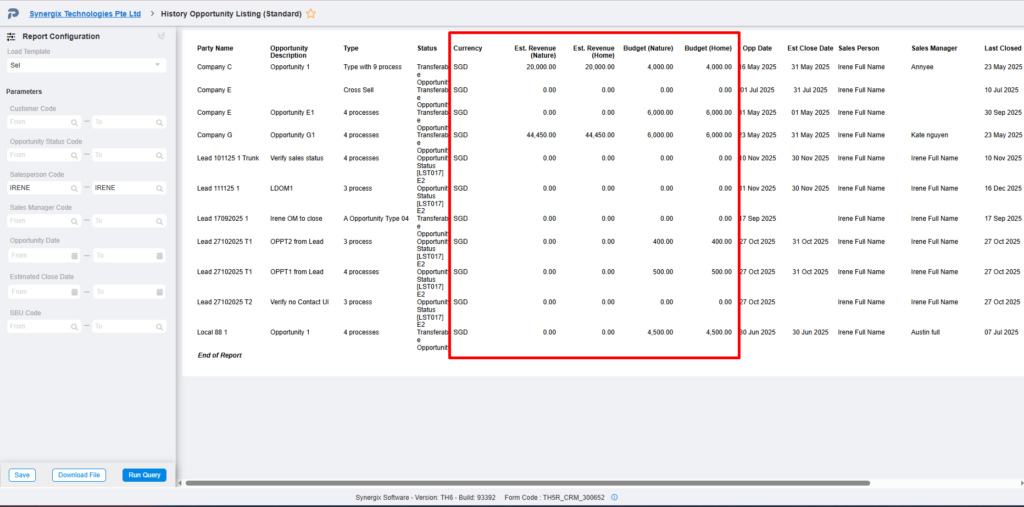
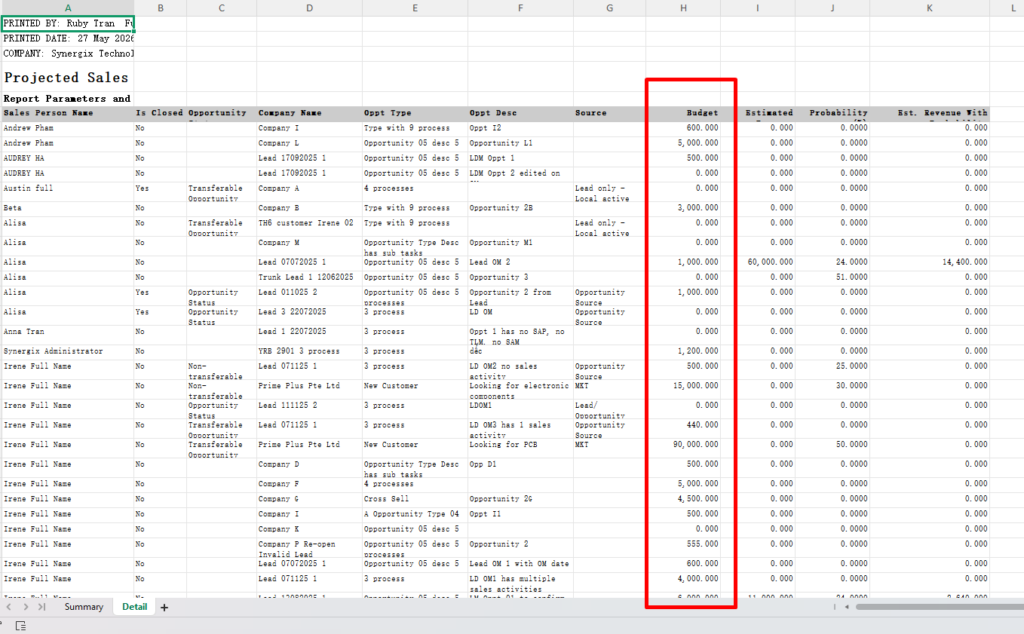
1.Enhancement to include budget field for the following reports: History Opportunity Report, Projected Sales by Opportunity Status, Outstanding Opportunity Report sequence (Formcodes: TH5R_CRM_300652, TH5R_CRM_300673 , TH5R_CRM_300651)
After this enhancement is released, the system will include the “Budget” related fields in the following CRM reports. Users does not need to refer to additional screens or manually cross-check the related data when reviewing opportunities that causes extra effort and is less convenient for daily reporting and analysis activities.
TH5R_CRM_300652 History Opportunity Listing
TH5R_CRM_300673 Projected Sales By Opportunity Status
TH5R_CRM_300651 Outstanding Opportunity Listing
Users will be able to view the budget information directly in the report output without needing to refer to other screens. This enhancement helps users review opportunity information more easily by displaying the budget details directly in CRM reports. Users can better analyze and compare opportunity value, projected sales, and budget information in a single report. It also reduces the need for manual checking across multiple screens, which improves efficiency and saves time. With more complete report information, users can make better business and sales decisions more quickly.
2.Report Template feature cater for dynamic report column display sequence (Form code: All Report Screens)
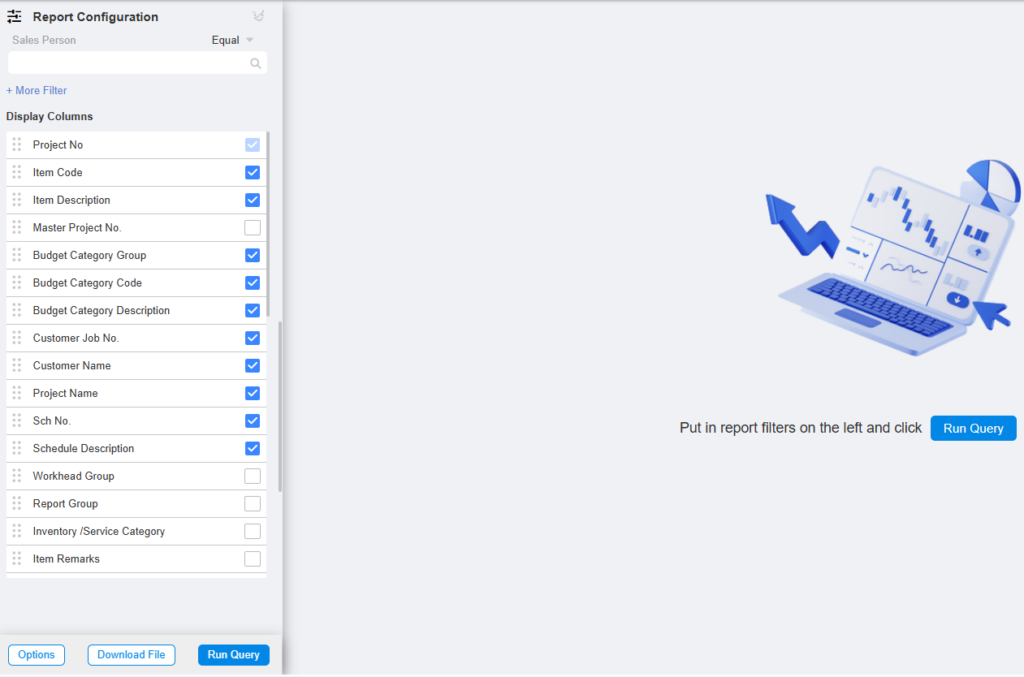
After this enhancement is released, newly created report templates in report screens are able to save both:
- the selected display columns (tick/untick columns), and
- the customized column display sequence (re-order arrangement).
When users load the same template again, the system will automatically apply the saved column settings and sequence accordingly.
This enhancement helps users save time when generating reports. Users can save their preferred displayed columns and column order in the report template, so they do not need to manually rearrange the report every time. It also provides a more consistent and user-friendly reporting experience, especially for users who frequently use the same report layout. Since the enhancement is applied at report engine level, all report screens can benefit from the same behavior for newly created templates.
3. InvoiceNow – Mandatory CRN Justification for Project Credit Note
Formcodes:
+TH5_PJ_CN_BILL_BY_PROJECT_PHASE_V1 – Credit Note for Billing by Project/ Phase
+ TH5_PJ_CN_BILL_BY_PROJECT_PHASE_V1 – Project Credit Note
+ TH5_PJ_PROJECT_CREDIT_NOTE_V1 – Project Credit Note
+ TH5_PJ_BILL_BY_PROJECT_PHASE_RETENTION_V1 – Billing by Project/Phase & Retention Billing
+ TH5_PJ_PROJECT_INVOICE_V1 – Project Invoice
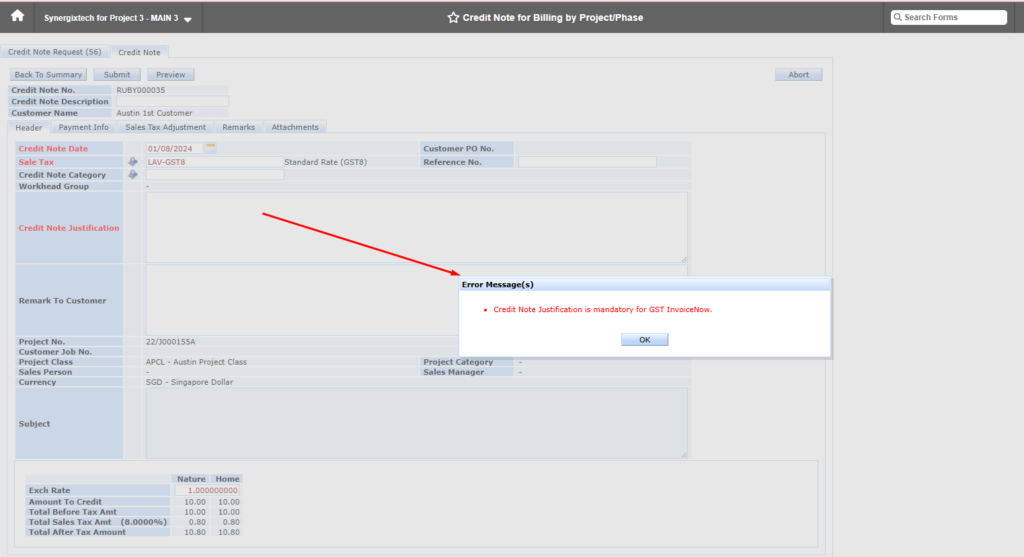
This enhancement is required to support GST InvoiceNow requirements for Project Credit Note transactions. InvoiceNow requires each AP/AR Credit Note to have a valid “Note”, which will be taken from the existing Credit Note Justification field. If this field is empty, IRAS may return an error, so the system needs to make it mandatory when GST InvoiceNow is activated.
After this enhancement, when GST InvoiceNow Status = Activated, the system will validate that Credit Note Justification is filled in before allowing users to submit Project Credit Note related transactions. If it is empty, the system will block the submission and show: “Credit Note Justification is mandatory for GST InvoiceNow.” The justification will also be stored and shown correctly in the Account Receivable Credit Note screen.
This helps customers meet GST InvoiceNow requirements and prevents IRAS submission errors caused by missing Credit Note justification. It also improves data completeness and gives finance users better traceability for each Project Credit Note.
PAYROLL & FINANCE
1.Payroll: Resignation Headcount By Nationality Report
(Formcode: TH6R_PY_400386)
The system enhances the Employee Turnover Report by adding resignation headcount analysis based on employee nationality. This allows HR users to better identify turnover patterns among different nationality groups and support deeper workforce analysis. As a result, organizations can identify retention risks and improve cultural fit and inclusion.