27 May 2025
Dear Valued Customers,
Thank you for choosing Synergix ERP Software. This May, we’re proud to introduce a fresh batch of enhancements designed to empower your team and strengthen your business operations.
Our latest updates focus on improving usability and user experience—so you can focus more on growing your business and less on manual processes. Whether you’re managing finances, customers, or contracts, these improvements aim to make your daily operations smoother and more intuitive.
We’re honored to support your journey with Synergix ERP. Let’s dive into what’s new this month!
Payroll & Finance
1. Account Receivable Transaction Listing to add Report Total (FC: TH5R_AR_000008, TH5R_AR_000009, TH5R_AR_000013)
Applicable to the Account Receivable module.
We have added a “Report Total” row to the Account Receivable Transaction Listing, summarizing the Sales Tax Home Amount and Total After Tax Home Amount across all customer codes.
This gives users a quick overview of total sales tax and invoice amounts without needing to calculate manually, improving reporting efficiency.

2. Fixed Asset Disposal to Add Fixed Asset Code Column (FC: TH6_FIXED_ASSET_DISPOSAL)
Applicable to Fixed Asset report section, module Fixed Asset
The report now displays the Fixed Asset Code alongside the asset description in the disposal screen. Users can now easily identify, filter, and sort vouchers by asset code, improving clarity and productivity.
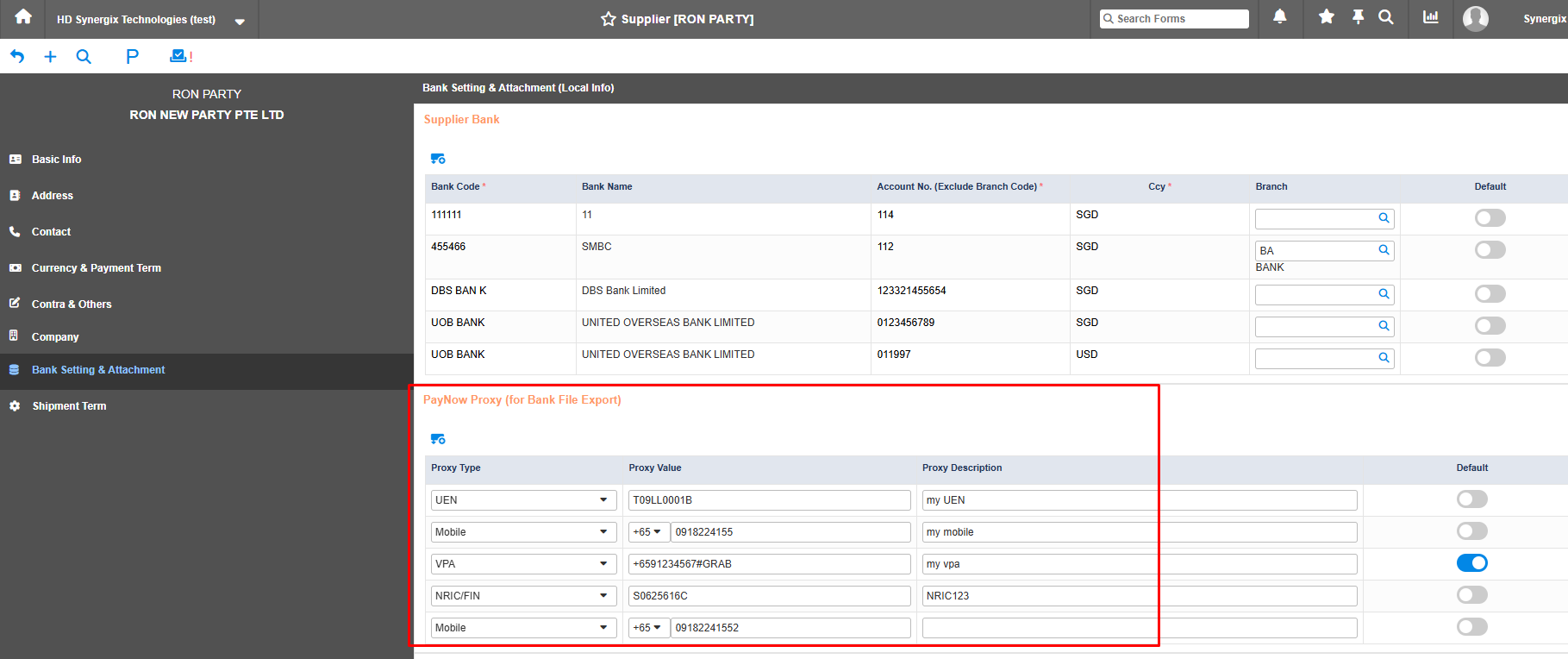
3. UOB PayNow Bank File for Supplier Payment (FC: TH6_UOB_BANK_FILE_EXPORT, TH6_SUPPLIER, TH6_AP_PAYMENT)
Applicable to UOB Bank File Export for Payment to Supplier screen and TH6_Supplier screen, TH6 AP Payment screen, module Account Payable.
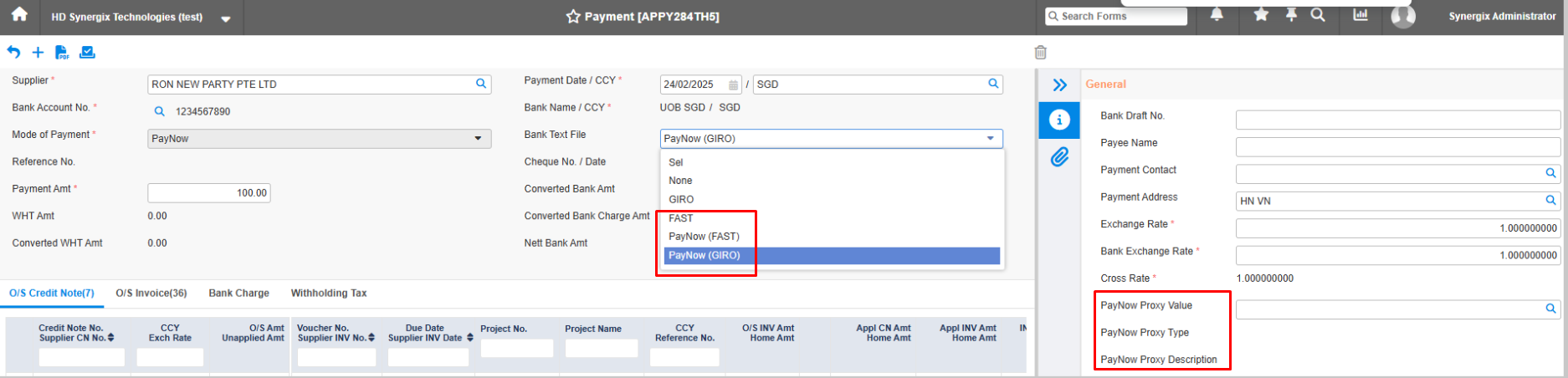
This enhancement was made to support bulk payments to suppliers via UOB Bank using PayNow GIRO (Normal/Express) and FAST options. Users can now set up PayNow details for each supplier in the Supplier screen.
When processing payments in TH6_AP_PAYMENT, users can select PayNow as the payment method.
The system can export UOB bank text files for PayNow payments, ready for upload to the bank portal.
This enhancement enables seamless bulk supplier payments via PayNow, saving time and improving payment workflow.
SCM & MFG
1.Prompt User on Duplicated Customer Name (FC: TH6_CUSTOMER)
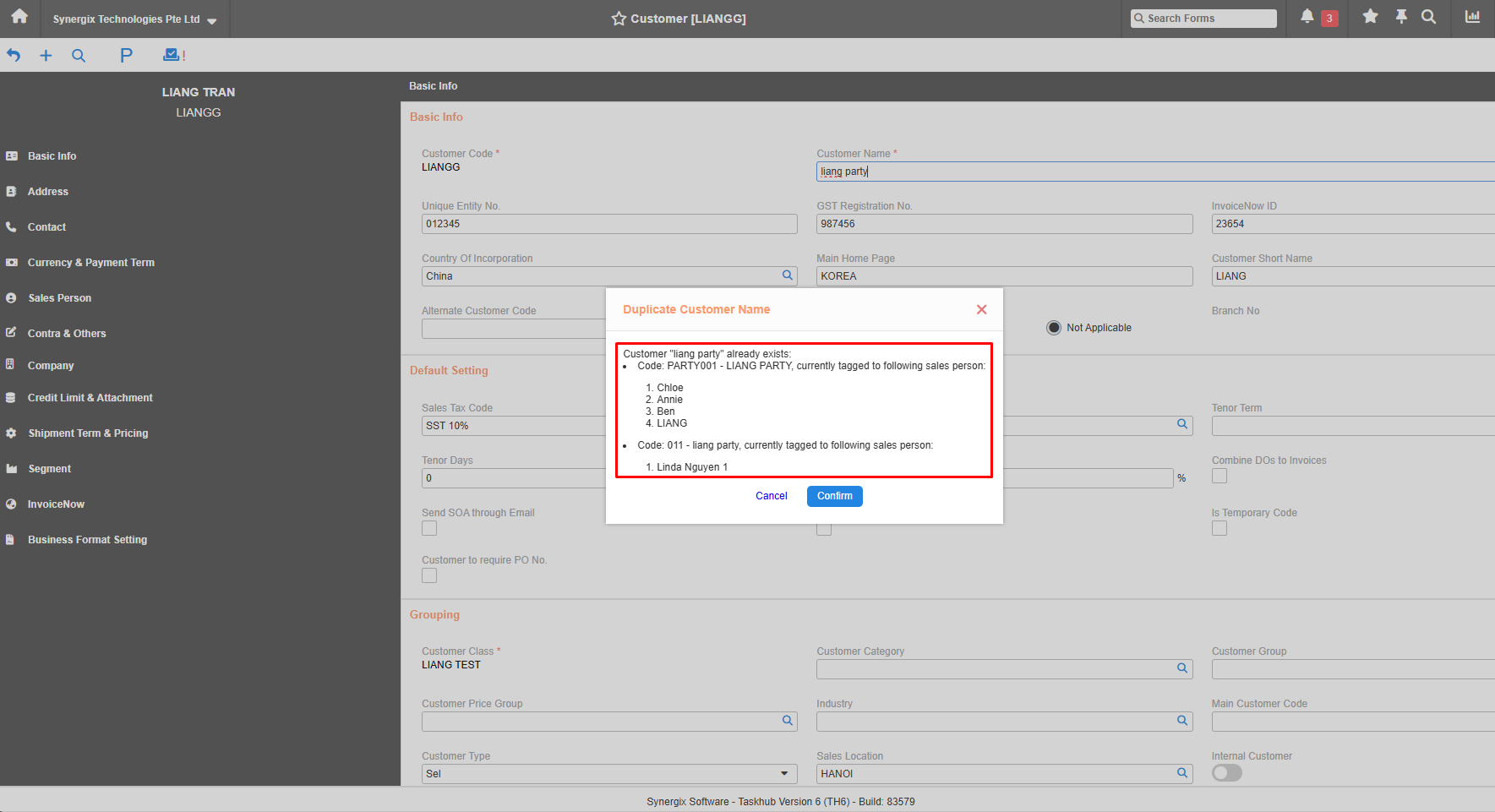
In case users could accidentally create a customer with a duplicate name, without knowing the customer already exists in the system, when a user enters a customer name and tabs or clicks out of the field, Synergix ERP system now checks for duplicates.
If a match is found, a confirmation pop-up will appear with the message:
“Customer ‘{Current customer name}’ already exists:
Code: {Customer Code} – {Customer Name}
Currently tagged to the following sales person(s):
{Salesperson 1}
{Salesperson 2}
…”
Actions:
Cancel / Close: Clears the entered name.
Confirm: Keeps the entered name.
This enhancement helps prevent duplicate records and ensures users can coordinate with the assigned salesperson if needed.
2. Display a message on Toolbar in Global Maintenance screen when there is change on data
(FC: TH6_CARTON_TYPE_MAINTENANCE
TH6_CUSTOMER
TH6_CUSTOMER_CLASS
TH6_CUSTOMER_CLASS_SCBB
TH6_CUSTOMER_PROJECT_BP
TH6_CUSTOMER_REWARD
TH6_CUSTOMER_REWARD_TAGGING
TH6_MT_PROCUREMENT_REASON
TH6_MT_WR_FAULT_TYPE
TH6_MT_WR_MOUNT_BASE_ITEM
TH6_MT_WR_ROOT_CAUSE_TYPE
TH6_MT_WR_WARRANTY_TERM
TH6_PALLET_TYPE_MAINTENANCE
TH6_PAYMENT_TENOR_TERM
TH6_SHIPMENT_PRIORITY
TH6_SUPPLIER_APPROVAL
TH6_SUPPLIER_CLASS
TH6_SUPPLY_CATEGORY
TH6_SUPPLY_TYPE)
Recently we’ve added a message on the toolbar in the global maintenance screen to notify users to click the submit button to apply any changes.
That clear message is now shown on the toolbar prompting users to click “Submit” to apply changes before they leave. This reduces the chance of unsaved data, improves visibility, and enhances user experience.

Project & Contract
1. Copy Function in Contract Quotation V1
(FC: TH6_CONTRACT_QUOTATION_V1)
Applicable to detailed Contract Quotation screen, contract module.
There are existing contract quotations that can be reused across the system. Re-creating a new one by manually keying in the same data as the previous one is time-consuming and prone to error. So, we enhanced the copy function in the contract quotation screen to cut back on repetitive work.
With the new Copy function, users can now duplicate existing contract quotations directly within the system. This enhancement significantly reduces the time and effort required to create similar quotations, especially for recurring or template-based contracts. It also minimizes the risk of manual entry errors and ensures data consistency. Overall, the feature improves user productivity and streamlines the quotation process.
2. Subcon Contract Export Format logic (FC: TH6_PJ_SUBCON_CONTRACT_V1 & TH6_PJ_SUBCON_CONTRACT_V2)
Previously we had made the enhancement on subcon claim import logic to the Subcon Contract screen with form code TH6_PJ_SUBCON_CONTRACT_V1. However, we had rollback the logic enhancement from form code TH6_PJ_SUBCON_CONTRACT_V1 and implement this logic enhancement to a newer version of form code TH6_PJ_SUBCON_CONTRACT_V2. The objective of this rollback is to provide users a grace period to familiarize themselves with the new logic and import template.
The import logic enhancement implemented in form code TH6_PJ_SUBCON_CONTRACT_V2 are listed below:
- Claim Type in Subcon Claim Import Template
- The default value is now determined based on either the Cost Type of the respective Subcon Contract No. (if there is no existing Subcon Claim Voucher) or the latest Subcon Claim Voucher history.
- “Previous Cumulative Claim” and “Previous Cumulative Certified” in Subcon Claim Import Template
- Renamed “Previous Cumulative Claim” and “Previous Cumulative Cert” columns to “Previous Cumulative Claim Amt” and “Previous Cumulative Certified Amt”, respectively.
- The system now displays the Previous Cumulative Claim Amt and Previous Cumulative Certified Amt of the respective Subcon Contract No.
- “Qty/Percent” Field in Subcon Claim Import Template
- Renamed to “This Cumulative Claim Qty/%”.
- Moved the column to appear after “Previous Cumulative Claim Amt”.
- The default value is now based on the latest Subcon Claim Voucher history of the respective Subcon Contract No.
- “Certified Qty/Percent” Field in Subcon Claim Import Template
- Renamed to “This Cumulative Certified Qty/%”.
- Moved the column to appear after “Previous Cumulative Certified Amt”.
- The default value is now based on the latest Subcon Claim Voucher history of the respective Subcon Contract No.
- Renamed “This Cumulative Claim” column to “This Cumulative Claim Amt”.
- Renamed “This Cumulative Certified” column to “This Cumulative Certified Amt”.
- Renamed “This Claim” column to “This Claim Amt”.
- Renamed “This Certified” column to “This Certified Amt”.
- Renamed “Less: Previous Certified After Retention” to “Less: Previous Payment for Work Done”. The default value is now based on the latest claim history.
- Omission Phase Display Logic in Subcon Claim Import Template
- When the module configuration “Enable to Input Claim and Certified Amount for Omission Phase” is set to Y:
- The Omission Phase is displayed under the “Variation Order” section with its respective data.
- When the module configuration “Enable to Input Claim and Certified Amount for Omission Phase” is set to N:
- The Omission Phase will not be displayed under the “Variation Order” section.
- The omission amount will be deducted from the Original/Addition Phase linked to the Omission Phase.