



Dear Valued Customers,
In October 2026, we are pleased to introduce a new set of system enhancements designed to improve workflow efficiency, strengthen operational control, and simplify day-to-day processes across key business functions.
At Synergix, our goal is not only to provide powerful ERP technology but also to equip businesses with the tools they need to operate more efficiently in an increasingly competitive environment.
Thank you for being part of the Synergix journey. Let’s explore what’s new this October!
PROJECT
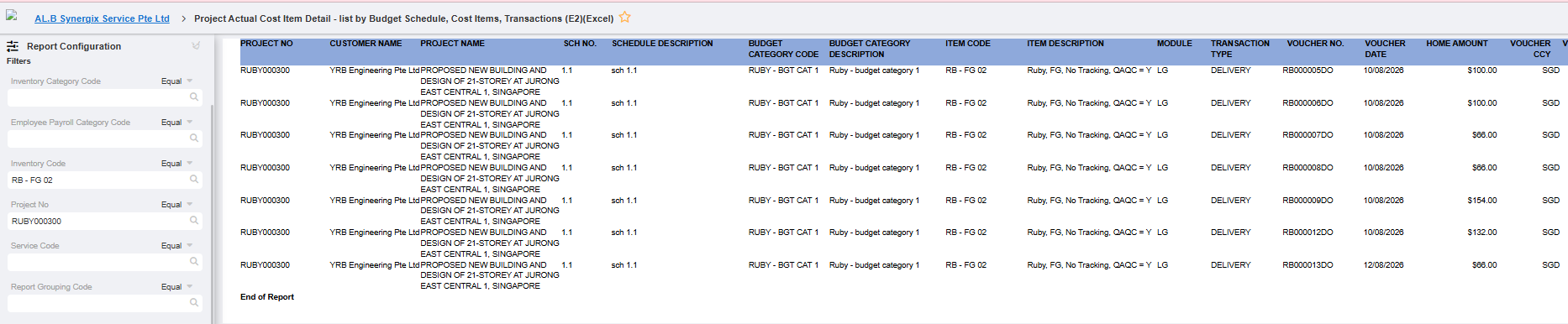
1.Project Actual Cost Item Detail report: include LG-DELIVERY transactions (Project Actual Cost Item Detail – list by Budget Schedule, Cost Items, Transactions.v1 (Excel))
Formcode: TH6R_PJ_300614
Applicable to: Project Actual Cost Item Detail report (Excel), Project (PJ) module, reading data from the Logistics (LG) Project Delivery Order.
The Project Actual Cost Item Detail report now includes transactions of Module = LG and Transaction Type = DELIVERY. Each delivery order voucher appears under its Budget Schedule and Cost Item, showing the voucher number, voucher date (actual shipment date), item code and remarks, quantity, and the amount in home, voucher and budget currencies. Project managers and finance users can now see the full actual cost of a project, including stock delivered to it, in one report. This makes project costing and cost-to-budget comparison more accurate and reduces the need to reconcile manually.
PAYROLL & FINANCE
1. Supplier Address structured format for ISO 20022 CBPR+ cross-border payments (AP Payment Bank Text File, TT/MEPS)
Formcode:
TH6_PAYMENT_BANK_FILE_EXPORT – HSBC
TH6_PAYMENT_DBS_BANK_FILE_EXPORT
TH6_SCB_BANK_FILE_EXPORT_FOR_PAYMENT
TH6_RHB_BANK_FILE_EXPORT_FOR_PAYMENT
TH6_OCBC_BANK_FILE_EXPORT_FOR_PAYMENT
Applicable to: Supplier Master (Supplier Address), Accounts Payable (AP) module, AP Payment Bank Text File for TT/MEPS payments. Applies only to customers using TT/MEPS payments.
From November 2026, banks will move to the ISO 20022 CBPR+ standard for cross-border payments. This standard requires the beneficiary address to be provided in separate structured fields (for example Street, Post Code, Town/City and Country) instead of one free-text address. Without this change, the AP Payment Bank Text File could be rejected by the bank and customers’ payments could be interrupted.
The Supplier Address now supports structured fields such as Block No., Street Name, Building Name and City/Town Name, so the AP Payment Bank Text File can provide the beneficiary address in the format required by the bank. To save customers from updating suppliers one by one, our support team will mass-update the data directly in the database. We will extract the Supplier Address listing from the live server into Excel and send it to the customer, who splits each address into the respective fields and returns the file for us to migrate. Customers stay compliant with the bank’s new requirement before November 2026, with minimal manual effort and no disruption to their TT/MEPS payment
SCM
1.Supplier Search — Search suppliers and view Top 10 suppliers by YTD purchase amount. (FC: SA_SALES_MANAGEMENT_E2A)
A new “Supplier Search” widget is now available on the Purchase Management Dashboard. By default, it displays a chart of the Top 10 suppliers ranked by year-to-date (YTD) purchased amount, using the selected Financial Year and Period. Amounts follow the Display Units (None / Thousands / Millions) set in Dashboard Settings. Users can also search for other active (non-suspended) suppliers and click any supplier name to open that supplier’s Purchase Management screen. This helps Purchasers quickly identify key suppliers, compare spending and drill down into supplier details in one click.
2.Outstanding PR/PO — Track PR sourcing, draft POs, and outstanding POs requiring follow-up. (FC: PU_PURCHASE_MANAGEMENT_E2A)
Applicable to: Purchase Management Dashboard screen, Purchase (PU) module.
A new “Outstanding PR/PO” widget is now available on the Purchase Management Dashboard. It lists PR Sourcing in draft (Status: Sourcing), draft POs (Status: PO in Draft) and POs with no shipment or partial delivery (Status: Pending Shipment) in one table, with outstanding PRs shown first, followed by direct POs. Each row shows the requestor, supplier contact and a colour-coded “Days Due” indicator (red for Overdue, orange for Due In 7 days or less), so urgent items stand out immediately. Users can sort and filter by most columns and click a Request No., Sourcing No., PO No. or Supplier Name to jump straight to the relevant transaction or Supplier Purchase Management screen. As a result, Purchasers save time, reduce missed follow-ups and keep procurement on schedule.