


ERP (enterprise resource planning) software manages a company’s internal operations: finance, inventory, purchasing, production, projects and HR. CRM (customer relationship management) software manages the customer-facing side: leads, sales pipeline, follow-ups and customer service.
The core difference is scope. ERP covers how the business runs; CRM covers how it wins and keeps customers.
For SMEs, the harder question is where the two meet. A quotation starts in CRM, then becomes a sales order, a delivery and an invoice in ERP. When the two systems don’t share data, that handoff is where errors and delays build up. This is why some ERP systems, including Synergix ERP with its built-in CRM module, keep sales and operations on one customer record.
This guide covers what each system does, how they differ and overlap, whether ERP includes CRM, and how to decide what your business needs first.
What Do ERP and CRM Mean?
What is ERP?
ERP is a comprehensive business management software that allows companies to manage their business processes. These processes may include financial management, business analytics, human resources, supply chain management, and project costing management, all of which are integrated into one system.
Using an ERP system is a pragmatic way to deal with data duplication problems because it clarifies communication between different departments/headquarters.
With an ERP, your information is stored in a central database, making it accessible to anyone authorised. This aids in keeping all data consistent and accurate, which later can provide helpful insights that are crucial for the decision-making process.

What is CRM?
CRM is designed to help businesses handle customer-related interactions. It provides many features for sales, marketing, and customer service departments.
With a CRM, businesses can manage their relationships with customers, track their interactions, and get valuable insights into customer behaviours. With that, businesses can personalise their interactions with customers and build long-lasting relationships.
What does “ERP CRM” mean?
When people search for “ERP CRM”, they usually mean one of two set-ups:
- An ERP system with a built-in CRM module, where sales and operations share one database
- A standalone CRM connected to a separate ERP through an integration
The choice between them affects cost, data accuracy and maintenance, which we compare later in this guide.
ERP vs CRM: Key Differences
The main difference is scope: ERP manages internal resources and transactions, while CRM manages customer relationships and sales activity.
| ERP | CRM | |
|---|---|---|
| Main purpose | Run operations and control costs | Win, grow and retain customers |
| Focus | Back office | Front office |
| Main users | Finance, operations, procurement, warehouse, HR, management | Sales, marketing, customer service |
| Core data | Transactions: orders, stock, purchases, invoices, payments, payroll | Relationships: contacts, leads, opportunities, activities, service cases |
| Typical functions | Accounting, inventory, purchasing, production, project costing, HR | Lead and opportunity management, pipeline tracking, campaigns, follow-ups, service tickets |
| Effect on profit | Lowers operating costs and errors; speeds up billing and collection | Increases sales and customer retention |
| Key reports | Profit and loss, cash flow, stock levels, project margins | Pipeline value, win rate, sales forecast, customer activity |
3 differences matter most when you choose a system:
- Who uses it: CRM is used mainly by customer-facing teams. ERP is used across the company, including management.
- What it records: CRM records what happens before and around a sale. ERP records the transactions that follow: delivery, invoicing, payment and the costs behind them.
- What breaks without it: Without CRM, leads and follow-ups slip. Without ERP, stock, billing and financial reporting depend on spreadsheets and manual reconciliation.
How ERP and CRM Work Together
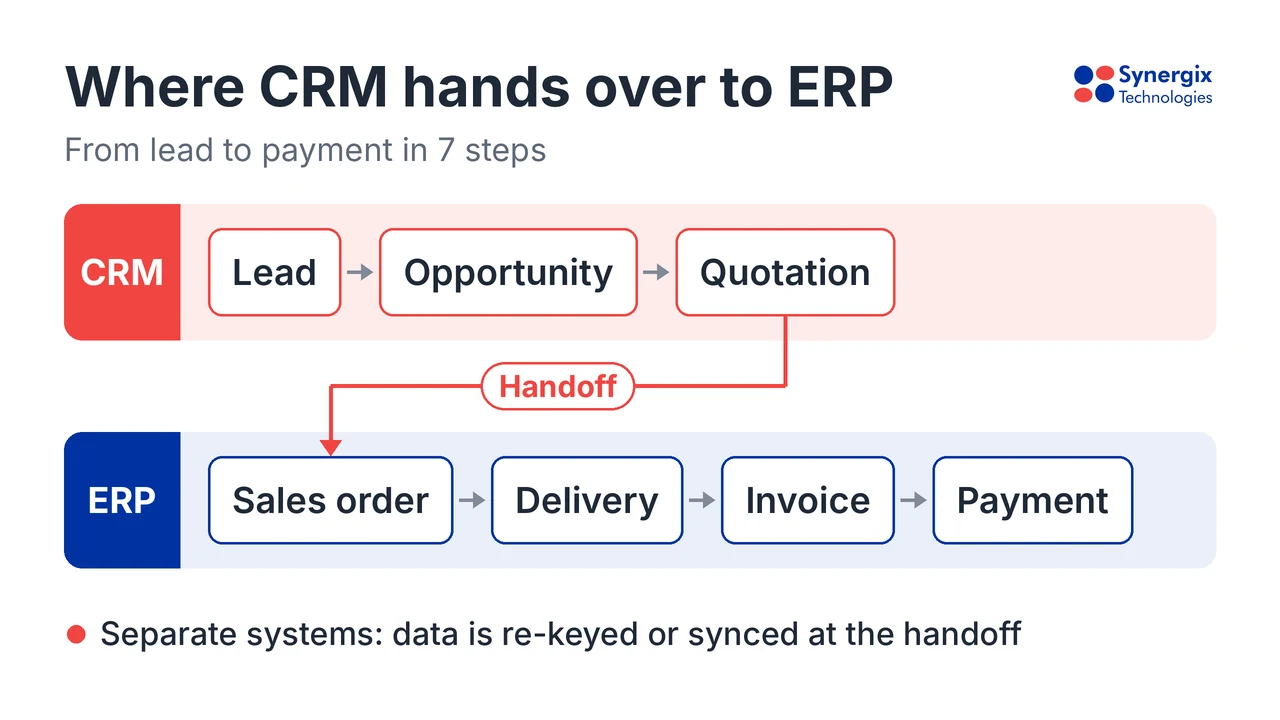
ERP and CRM meet in the quote-to-cash process: the steps that turn a lead into payment received. CRM owns the first half; ERP owns the second.
- Lead captured (CRM): an enquiry arrives from a website form, call or referral
- Opportunity qualified (CRM): needs, budget, decision-makers and competitors are recorded
- Quotation issued (CRM or ERP): pricing, discounts and approval
- Sales order confirmed (ERP): stock is reserved or a purchase is triggered
- Delivery or service completed (ERP): delivery order, project progress or job sheet
- Invoice issued (ERP): tax invoice or e-invoice, posted to accounts
- Payment collected (ERP): receipt, credit control and reporting
Both systems also hold customer data. CRM holds contacts and interaction history. ERP holds billing details, credit terms, order history and outstanding balances.
When the two systems are separate, someone has to keep these records in sync. These are the failure points we see most often:
- Quotations re-keyed into the accounting or ERP system, with errors in prices or quantities
- Salespeople promising delivery dates without seeing current stock
- New deals closed with customers who still have overdue invoices
- Two versions of the same customer, with different addresses or contact persons
If you plan to connect separate systems, our guide to ERP system integration explains the common methods and their trade-offs.
Why CRM Alone Often Falls Short for Businesses
When SME owners ask whether we have a CRM, we first ask what they mean by CRM. Some mean a tool to prepare and track quotations. Others mean a customer database, or a full sales pipeline with campaigns.
The definitions differ, but the gap is usually the same. A CRM sees only the customer side of the business, while most daily problems sit between sales and operations. Two situations come up often:
- Selling stock that is already gone. Inventory is tracked in a spreadsheet that isn’t updated in real time. Two salespeople sell the last unit to different customers, and one commits to a delivery date the company cannot meet. The CRM shows a won deal; the customer sees a late delivery.
- Slow after-sales service. A customer reports a fault with a product bought last year. Without warranty and service records linked to the customer, staff search through files and emails to confirm what was sold and whether it is still under warranty. The delay affects how that customer rates you in their next vendor review.
In both cases, the CRM did its job; the missing link was data from inventory and after-sales service. A CRM works best when it sits on, or is closely tied to, the same data as stock, service and accounts.
ERP, CRM or Both?
Start with the problem that costs you most today, then match it to a set-up. Use this table as a first filter.
| If this describes your business | Likely fit |
|---|---|
| Sales-led, few products or services, and the main issue is lost leads or missed follow-ups | Standalone CRM, alongside your existing accounting software |
| You hold stock, run projects, manufacture, or deliver services under contract | ERP first |
| Departments work from separate spreadsheets and month-end closing takes days | ERP first |
| Sales need stock, pricing or order history to quote accurately | ERP with built-in CRM |
| Quotations are re-keyed into accounting or inventory systems | ERP with built-in CRM |
| You already run an ERP and only need better pipeline tracking | Add the ERP’s CRM module, or a CRM integrated with it |
| Your IT team is small and you want one vendor and one upgrade cycle | ERP with built-in CRM |
A standalone CRM can be the right answer for a small, sales-led team. If that fits your business, our guide on how to choose a CRM system for your SME covers what to compare.
Separate CRM Plus Integration vs ERP with Built-in CRM
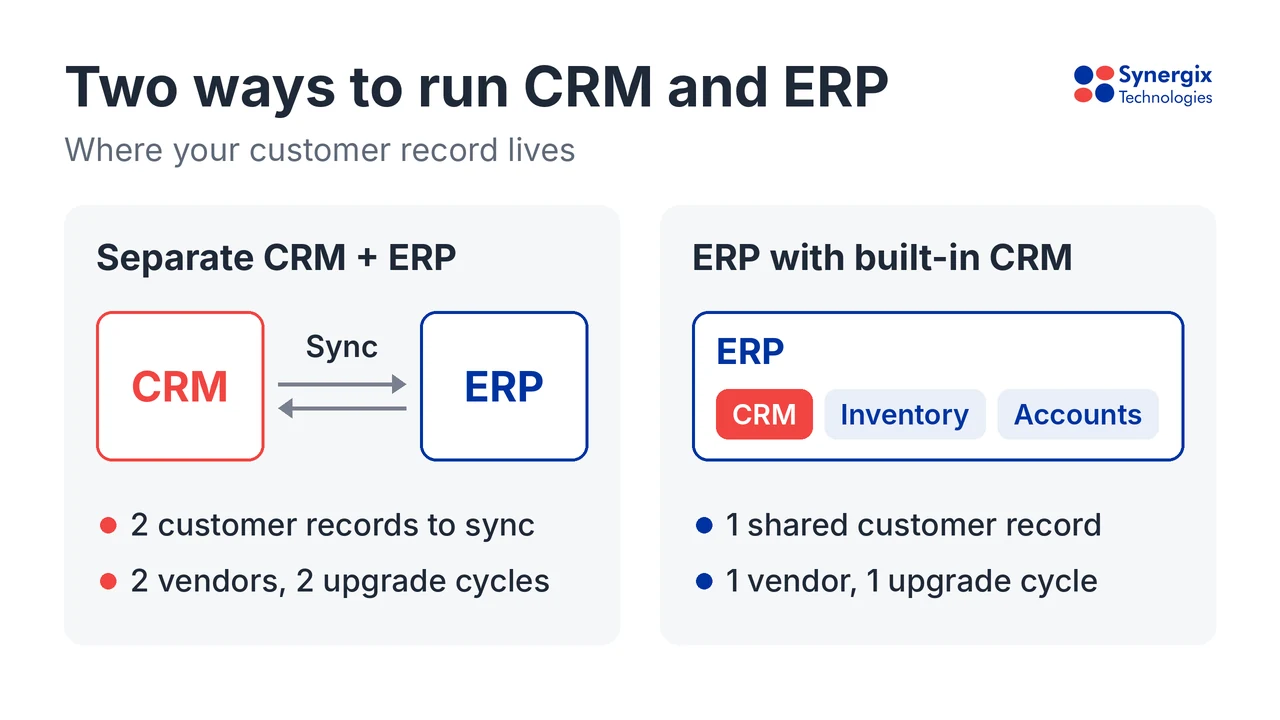
Both set-ups can work. The trade-off is between choosing each tool independently and keeping a single set of customer data.
| Separate CRM and ERP, integrated | ERP with built-in CRM | |
|---|---|---|
| Customer record | Two records, kept in sync by the integration | One record shared by sales and finance |
| Quotation to invoice | Data passed between systems; errors appear when a sync fails | Quotation, order and invoice in one system |
| Users and permissions | Managed in two systems | Managed once, with role-based access |
| Upgrades and maintenance | Two vendors; the integration may need rework after either system upgrades | One vendor, one upgrade cycle |
| Cost structure | Two subscriptions or licences, plus integration build and upkeep | One contract; CRM usually priced as a module |
| Best for | Large sales or marketing teams with complex needs, and IT staff to maintain the integration | SMEs that want sales, operations and finance on one set of data |
This choice also affects budget. In Panorama Consulting’s 2026 ERP Report, more than a quarter of organisations exceeded their project budgets, and additional technology needs were the leading cause. Decide at the start whether CRM will sit inside the ERP or in a separate system, and budget for any integration up front.
What an ERP with Built-in CRM Looks Like in Practice
In Synergix ERP, the CRM module covers sales, campaign and opportunity management on the same database as the rest of the system:
- Pipeline by product line: group opportunities by product line, brand or business unit for clearer sales projections
- Shared ownership: tag the telemarketer, salesperson and sales manager on each opportunity, each with their own access rights
- Activity and follow-up log: record every sales activity and next action, so handovers keep their context
- Opportunity costing: track the time and cost spent on each lead to judge whether it is still worth pursuing
- Competitor tracking: record each competitor’s strengths and weaknesses per opportunity
- Stage-by-stage sales process: see which steps are complete and what is still needed to win the deal
Because the CRM sits inside the ERP, it connects directly to quotations with online approval, stock reservation, invoicing, and contract, warranty and maintenance management.
For sales teams that take orders by email or chat, Synergix’s embedded AI adds an AI Sales Assistant that suggests products and drafts quotations and sales orders, and WhatsApp Message Processing, which turns WhatsApp Business conversations into draft sales orders or service tickets.
Choosing the Right Set-up for Your Business
ERP and CRM solve different problems, but most SMEs need both functions once they hold stock, run projects or manage service contracts. The practical choice is between two systems kept in sync and one system that covers both.
Synergix Technologies has developed and implemented ERP for SMEs for over 35 years, with more than 600 SMEs and 30,000 users on our system. Our cloud-based ERP includes a CRM module, industry-specific functions and role-based training for every user.
Book a free demo to see how sales, inventory and accounts work from one customer record.