



Choosing HCM software takes five steps, and working through them in order matters. Most system choices go wrong because features get picked before anyone checks which problems cost time each month. Once that is clear, the hardest call is whether labour cost needs to reach individual projects, which is what separates a standalone HCM from HR inside an ERP.
Start with what you need, then work down to how you test it.
Step 1: Check if You Need HCM Instead of HRM
Human Capital Management (HCM) and Human Resource Management (HRM) are easy to confuse because they are related and overlap in places.
In short: HRM is largely reactive and manages the day-to-day relationship between employees and the company, such as hiring, compliance with employment law and employee benefits. HCM manages the workforce with a strategic view, focusing on individual growth, training and longer-term workforce planning.
Explore the distinction in full in our guide to human capital management.
For choosing software, what matters is which problem you are solving:
- You need HRM first if payroll, leave, attendance and statutory compliance are where time and errors go
- You need HCM if you also need to plan headcount and skills, run appraisals and training, or build succession plans
Most Singapore SMEs start with the first and grow into the second, which is why the ability to add talent features later matters more than having them on day one.
Step 2: Pinpoint the Bottlenecks in Your Current HR Process
Start by following one month’s pay run from timesheet to payslip to ledger. Sit with HR, finance and operations, and note every point where data is typed in twice, chased over email or checked by hand. The bottlenecks usually show up in one of these places:
| Where it gets stuck | Signs you will notice |
|---|---|
| Attendance to payroll | Hours and overtime arrive on paper, in photos or from a separate clock-in app, and HR types them in again |
| Leave and claims | Balances sit in a spreadsheet, staff ask HR to check them, and approvals happen over email |
| Statutory updates | Someone has to remember to apply changes such as the CPF rate increase on 1 January 2027, plus SDL and IR8A rules |
| Payroll to finance | Finance re-keys payroll totals into the ledger and spends days reconciling at month-end |
| Labour cost by project | Project managers only see labour cost weeks after month-end, once costs are split by hand |
| People development | Appraisals live in Word files and training records are scattered across teams |
Rank what you find by how much time each problem takes every month and how much risk it carries, such as a missed CPF update. The top of your list becomes your must-haves in Step 3, and anything that touches finance or project costs will shape your choice in Step 4.
Also agree early on who will own the system. HR-led projects usually lean towards a standalone HCM, while finance- or operations-led projects often lean towards ERP.
Step 3: Prioritise the Features You Need Most
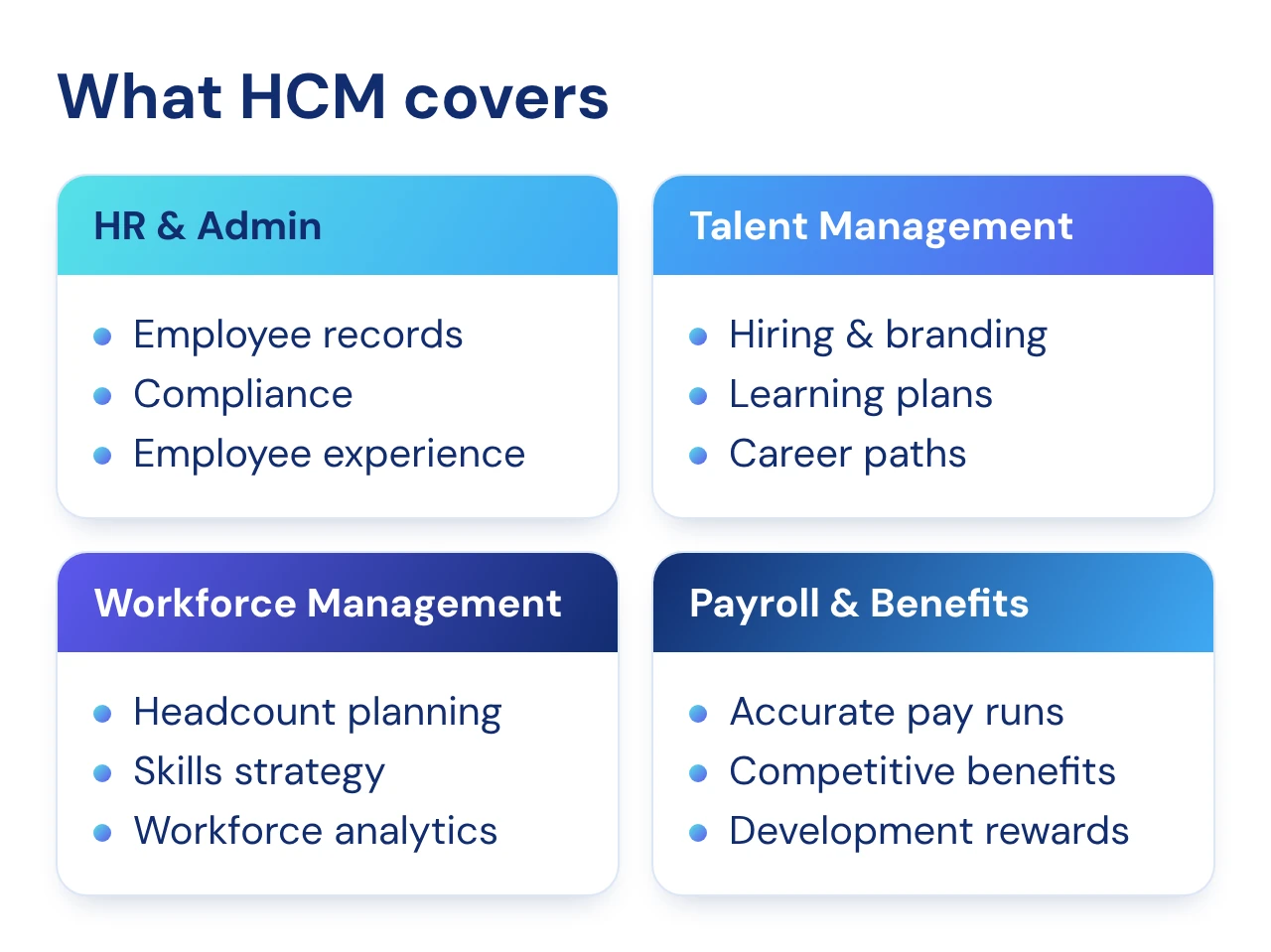
Turn your ranked list of bottlenecks into a feature list. Must-haves are the features you need from day one; everything else can be added as you grow. HCM covers four main areas:
- HR and Admin: employee records, compliance, and a better, more personal employee experience
- Talent Management: long-term hiring plans, a strong employer brand, learning plans and career paths for future leaders
- Workforce Management: headcount and skills planning, a skills-based people strategy and workforce analytics
- Payroll and Benefits: accurate, compliant pay runs, competitive pay and benefits, and rewards that encourage development
For most SMEs, the must-haves are core employee records, payroll, leave, attendance and statutory compliance. Appraisal, learning and workforce planning can usually be added later. Keeping this split clear keeps your first rollout focused and prevents scope creep.
Step 4: Choose How HCM Connects to Your Finance and Projects
How your HCM connects to the rest of the business matters as much as its features. HCM software comes in two forms: a standalone system linked to your accounting software, or an HR module built into an ERP.
Outsourcing to a payroll bureau is a third route, though it covers payroll rather than the wider HCM functions. We compare all the options in our guide to types of payroll systems.
Standalone HCM
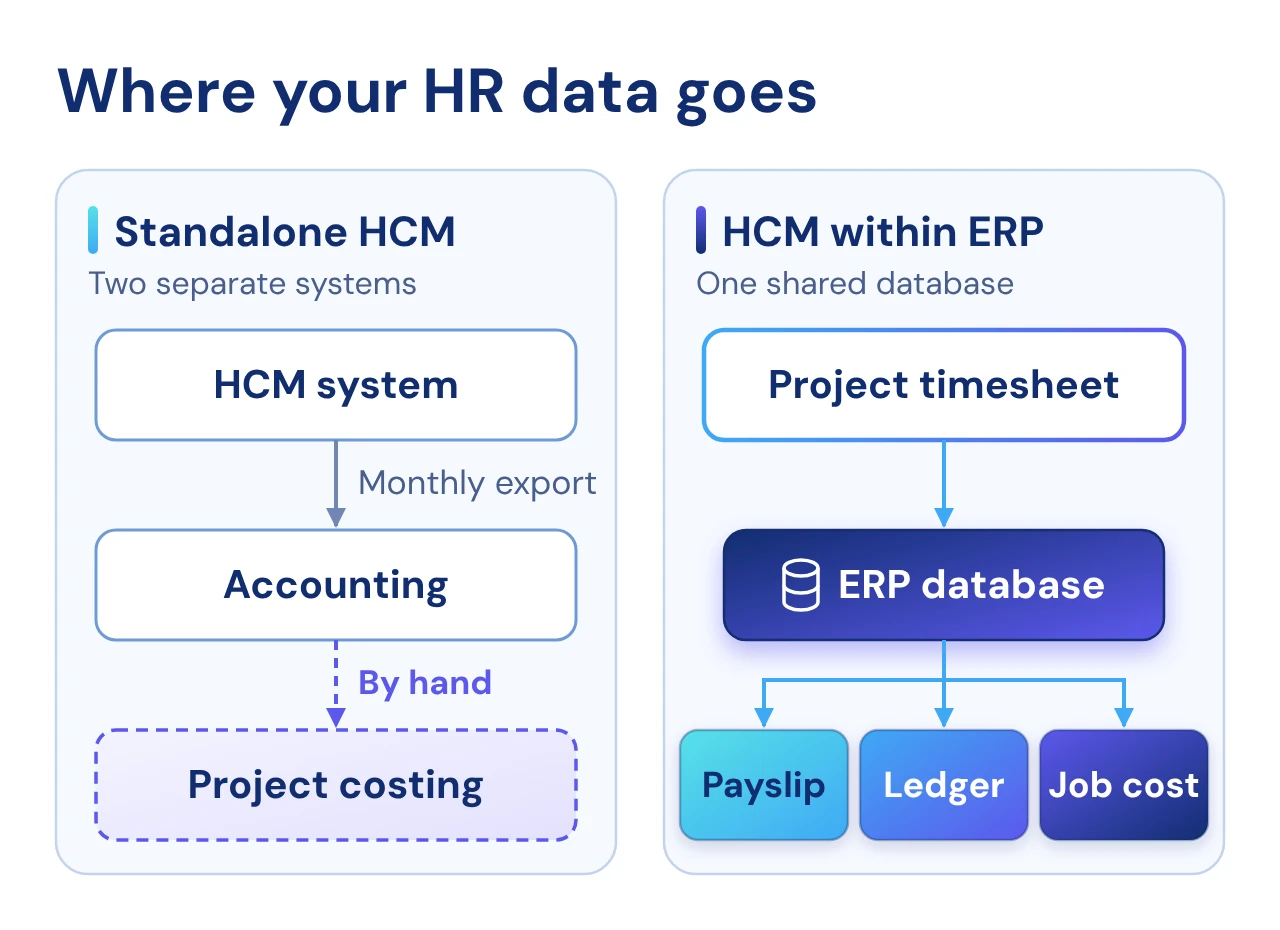
A standalone HCM is a tool dedicated to managing people. It holds the employee record and runs HR tasks such as payroll, leave, claims, attendance, appraisal and training.
To share data with other departments, it can be linked to accounting software through a file export or an integration, usually to post payroll costs to the ledger each month.
Strengths:
- HR-focused features: the whole system is built around people processes such as leave, appraisal and training
- Faster setup: it only touches HR and payroll, so the rollout takes less time
- Easy to own: HR can run it day-to-day without involving finance or IT
Limitations:
- Separate data: HR and finance sit in different systems, so payroll costs must be exported and reconciled every month
- Limited project costing: seeing labour cost by project, site or job takes extra manual work
HCM within ERP
In an ERP, HCM is one module in a suite that also runs finance, procurement, inventory and project costing. All modules share one database, so employee data and labour costs flow straight into the rest of the business. A timesheet tagged to a project, for example, updates the payslip, the ledger and the job cost at the same time.
Strengths:
- One source of truth: no exports, double entry or monthly reconciliation between HR and finance
- Real-time labour costing: cost is tracked by project, site or job as timesheets come in
- Combined reporting: HR, finance and operations report from the same data
Limitations:
- Wider rollout: HR is one part of a bigger system, so implementation takes longer
- Varying HR depth: some ERPs cover core HR only, so check talent features such as appraisal, training and recruitment
Standalone HCM vs HCM within ERP
| Standalone HCM | HCM within ERP | |
|---|---|---|
| Link to finance | Export or integration with accounting software | Same database as finance and operations |
| Labour cost by project | Manual or limited | Built-in, from timesheet to job cost |
| HR features | Strong and HR-focused | Varies by vendor; check talent modules |
| Implementation | Faster, HR and payroll only | Longer, part of a wider rollout |
| Reporting | HR reports, with finance reported separately | Combined HR, finance and project reports |
Integration is only half the check. Also look at how well the system fits your own rules, such as overtime schemes for different employee groups, shift rosters or site allowances, without custom development.
Which one fits your business?
The right choice depends less on company size than on how closely your labour cost needs to connect to the rest of the business.
- Do you need to see labour cost by project, site or job? If yes, HCM within ERP saves you from matching timesheets and payroll by hand every month.
- Is your current finance system working well? If finance runs smoothly and only HR is the problem, a standalone HCM fixes the bottleneck without replacing what works.
- How many systems does payroll data pass through? Every handoff is a chance for error, and every statutory update has to reach each system that uses payroll data.
- Where will your business be in three years? If you plan to take on more projects, sites or entities, choose a setup that can grow with you rather than one you will outgrow.
In short, choose a standalone HCM if your main goal is to simplify HR and develop your people, and your labour cost does not need to reach individual projects. Choose HCM within ERP if labour is a major cost of your projects and you need HR, finance and operations working from the same data.
Step 5: Test Vendors on Your Real Workflows
A standard product tour shows what a system can do, not how it handles your work. Ask each vendor on your shortlist to walk through your real workflows, such as:
- Onboarding: adding a new hire and setting up their payroll and leave entitlement
- Overtime: approving OT from a site timesheet and seeing it in the next pay run
- Month-end: pushing payroll to the general ledger and, if you need it, the job cost
See What Synergix HRMS Can Do for You
Whichever path you choose, pick a system you will not outgrow. Synergix HRMS is part of Synergix ERP, so you can start with HR and payroll and bring in finance and project costing when you are ready. With those in place, staff clock in against a project and labour cost flows to the payslip, the ledger and the job cost in one run.
Key features include:
-
- Payroll: payslips, CPF file extraction and IR8A submission, with ad hoc payments, loans and benefits-in-kind flowing into the pay run
- Time and attendance: a biometric timesheet with a mobile app that updates timesheets automatically, plus shift planning
- Overtime: OT schemes set per employee group, with OT pay calculated straight from the timesheet
- Leave and claims: self-service leave applications with online approval and real-time leave balances
- Talent: performance appraisal, training and e-recruitment modules
- Reporting: standard HR and statutory reports
- Embedded AI: AI runs inside the ERP, so employee data stays within the system and inherits the same roles and permissions your HR records already use
Up to 50% support with the EDGE Grant
Eligible Singapore SMEs can receive up to 50% of qualifying costs for Synergix HRMS under the EDGE Grant. Support levels and caps differ by activity, so check your eligibility with us or on Enterprise Singapore’s EDGE Grant page.
Find the Right Setup for Your Business
Whether you need a standalone HR system or HR inside your ERP, our consultants can help you assess your needs and check your grant eligibility. Contact us for a free demo based on your own workflows.