


Dear Valued Customers,
In September 2026, we are pleased to introduce a new set of system enhancements designed to improve workflow efficiency, strengthen operational control, and simplify day-to-day processes across key business functions.
At Synergix, our goal is not only to provide powerful ERP technology but also to equip businesses with the tools they need to operate more efficiently in an increasingly competitive environment.
Thank you for being part of the Synergix journey. Let’s explore what’s new this September!
PAYROLL
1.Apply Leave on Attendance Dashboard for Operational Efficiency
(Form code: Attendance Dashboard)
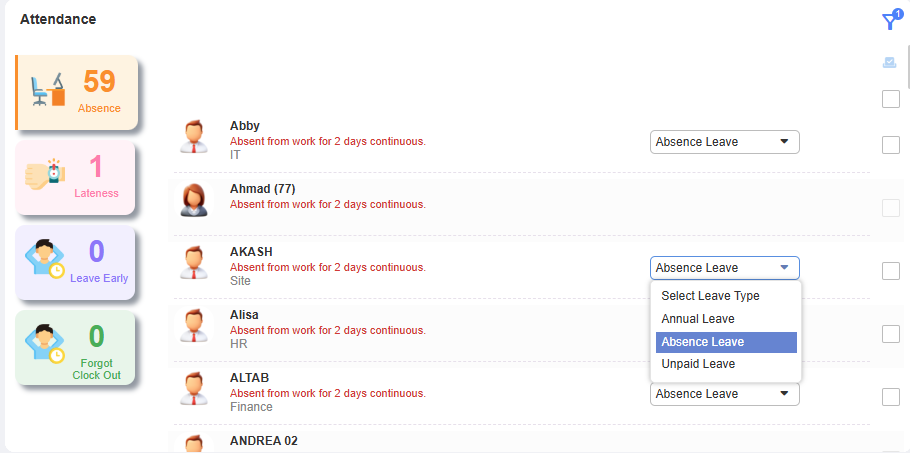
With this enhancement, the Attendance Dashboard now allows authorized users to apply leave directly from the Absence tab for employees under their responsibility. Users can select one or multiple employees and choose an eligible leave type directly from the dashboard, while leave types requiring supporting documents or salary deduction are excluded. Upon submission, the system will create and route the leave application to the approving officers. This enhancement reduces navigation and manual steps, improving operational efficiency in managing employee absences.
2.Payroll: Handle Fixed Payment in E2 Mass Update Salary & Designation
(Formcode: TH6_MASS_UPDATE_SALARY_DESIGNATION)
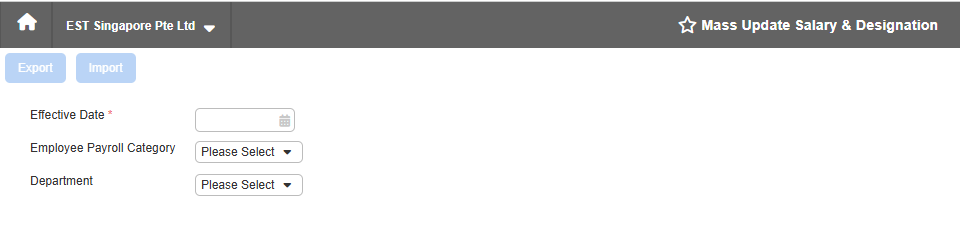
Two new tabs, Fixed Payment and Fixed Deduction, are added to the Mass Update Salary & Designation import template. Users can export and import Excel files to update multiple employees at once, with effective dates, amounts, frequency, and proration settings.
This enhancement allows users to update fixed payment and deduction information for multiple employees in one operation. It reduces manual data entry and makes mass payroll updates faster and more efficient. Built-in validations also help ensure that only valid employee and service information is imported.
SCM
1. Year-To-Date Purchase by Item Category (FC: YTD_PURCHASE_BY_ITEM_CATEGORY)
With this new update, a pie chart now shows year-to-date purchase spend by item category as a Dashboard widget, with an optional supplier filter. This gives purchasing teams instant visibility into top spending categories, helping them track budgets and make faster decisions — no separate report needed.
2.Outstanding Sales Order Dashboard Widget Enhancement
A new Outstanding Sales Order widget was added to the Sales dashboard, separating orders into Overdue and Due Soon based on the Required Shipment Date. Users can now see important information such as Days Due, outstanding amount, related Purchase Order number and status, supplier, purchaser, and PO date directly from the dashboard. The widget also provides filters for Days Due, Customer Code, and Sales Order Number, while respecting supervisor and SBU access permissions. This helps sales teams identify urgent orders earlier, follow up on purchasing and fulfilment status more efficiently, and reduce the risk of delayed customer deliveries.