



The gap between the timeline you agree to at signing and the one you actually run is where most SME ERP budgets come apart.
Most SME owners we meet can explain what they want an ERP system to do for them. Ask when it will be live, and the answer is usually a number somebody mentioned at a demo. That number is rarely wrong on purpose. It is built on assumptions about how much of your team’s week is genuinely available, and those assumptions are where budgets and timelines quietly come apart.
What follows is the ERP implementation timeline and the bits where smaller companies get stuck, drawn from what we see implementing our own ERP solutions in Singapore SMEs.
Why ERP Implementation Timelines Are Harder To Hold In A Small Company
A three-thousand-person company can lose two months on a project like this and absorb it. There is a project office, someone in finance who can be freed up for a quarter, probably a full-time person whose job for six months is chasing master data. You have none of that. Your project lead is the operations manager, and the operations still need managing while she does it, which is what governs your timeline rather than anything about the software.
The industry numbers have moved recently. Panorama Consulting’s 2025 ERP Report put the average project at around nine months, down from roughly 15.5 months the year before, mostly because cloud deployment cuts out the infrastructure work at the front. Unfortunately, the same report revealed that over a quarter of organisations overspent, with the most common reason being added technology, in other words, additional things that were not part of the original scope.
ERP Implementation Timeline: Where The Weeks Go
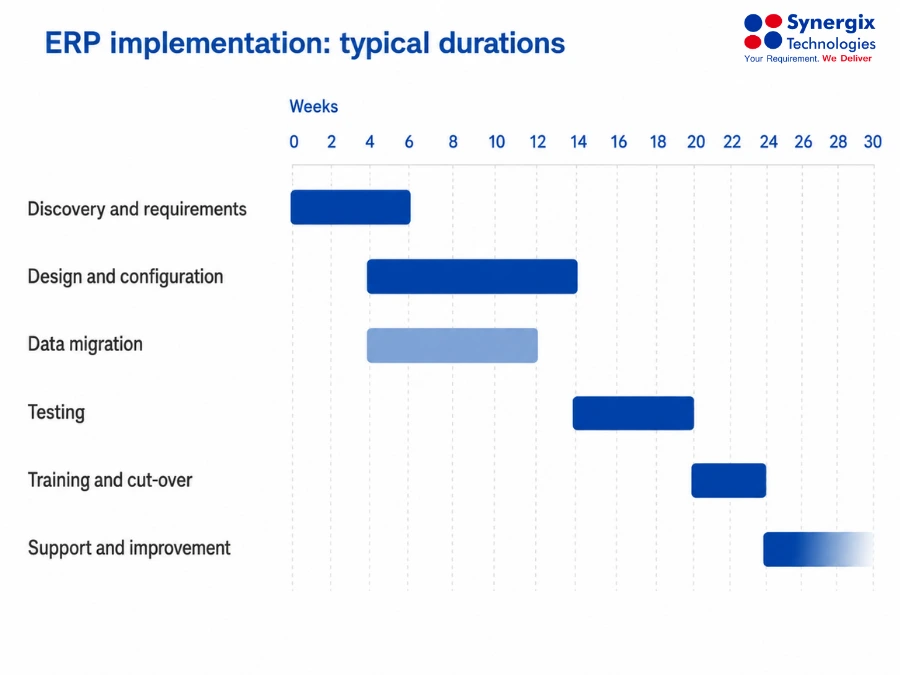
Typical stage durations on an SME ERP project
The ranges below assume the clock starts at contract signature. Choosing a vendor happens before any of this and is covered separately in the implementation process guide.
1. Discovery, or finding out how your business really works (2 – 6 weeks)
A member of the vendor joins with each department to trace the actual process, but it is almost always not the same as the one described in the manual. Typically, this is the place you will experience the efficiency increase, so it should be a place to be uncomfortable rather than feel protected. If your inventory has been inaccurate since 2023, then it is the perfect time to share this information.
You want to leave with a written list of processes in priority order, a determination of what is not going to be in phase one, and a named person for each module that will agree to give up the hours. Our ERP system requirements checklist works well as a prompt sheet for these sessions.
2. Design and configuration (4 to 10 weeks)
Chart of accounts, approval limits, document numbering, warehouse structures, permissions. Continue to ask the difference between what you need to be configured and what requires you to write code, since they are an entirely different cost and affect the system differently when you upgrade at a later date. All things on the second list should come with an argument.
Here, selecting modules pays off. A distributor may start with supply chain management and financial management only add the wholesale distribution extras once people trust the core.
3. Data migration, which takes longer than you think (3 to 8 weeks, in parallel)
You will be asked for customers, suppliers, items and opening balances in a fixed format, and what comes back is duplicated names for customers, customers who are no longer in business in 2019, and even three names for the same product because three different people created it separately.
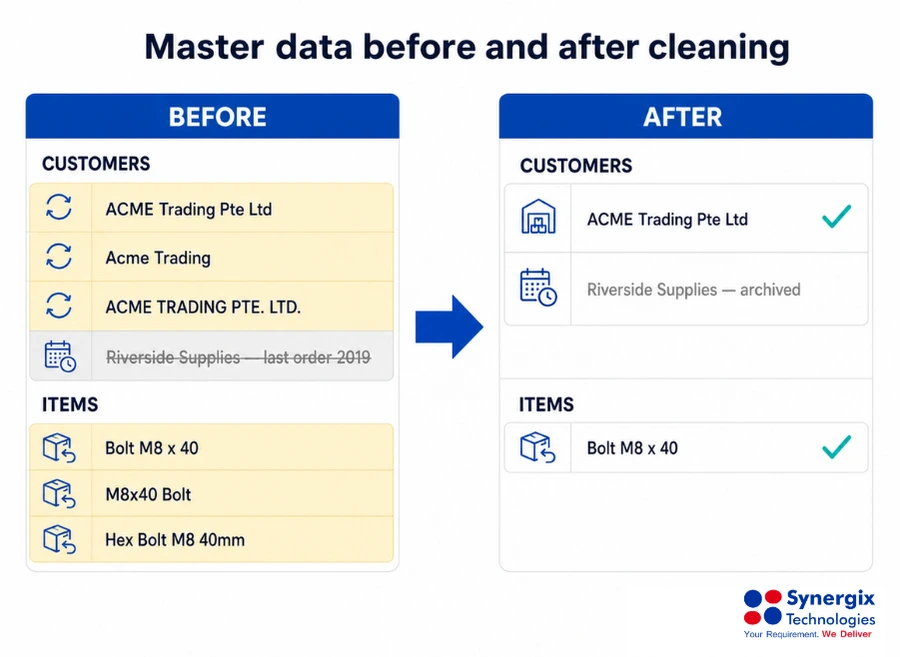
The cleaning happens before import, not after
Our data migration in ERP implementation guide identifies the 4 stakeholders that need to work together. The one that SMEs often overlook is their own data owners, and they are the most important because only your employees know which of your data is still legitimate.
Import master data and opening balances. Keep the historical transactions read-only in the old system, since moving five years of closed invoices costs money and nobody goes back to them.
4. Testing (3 to 6 weeks)
Your staff, not the vendor, run real work through the configured system. A sales order from enquiry to invoice, a purchase from requisition to payment. Two things decide whether the stage is worth anything.
- Make use of your awkward cases. So, don’t throw the “clean” one from the training deck at it, but the one of a customer with 3 delivery addresses and a negotiated price list instead.
- Maintain a single issue log, with a status on each item, that everyone can see. When a problem is verbally raised by the lift, it is not fixed and comes back disguised in the second week of go-live.
5. Training, then the cut-over (2 to 4 weeks)
Train late, train by role rather than by module; that’s because what you teach three months in advance is lost when someone needs it, and an afternoon of learning how to use general ledger won’t be very welcome to your storeman. Take the start of a financial period, avoid your busiest month, and assume a fortnight of reduced output afterwards. Tell your customers rather than hoping they will not notice.
6. The months after go-live
The stage nobody budgets for. Reports need reworking once people see them filled with real data, somebody has invented a laborious workaround for something the system already does, and a process you parked in phase two is now worth picking up.
Automation only starts to be worth anything here, since it depends on clean records underneath. Once your purchase orders and goods receipts are reliable, the three-way matching in our AI modules can check supplier invoices against them and put only the disagreements in front of a person.
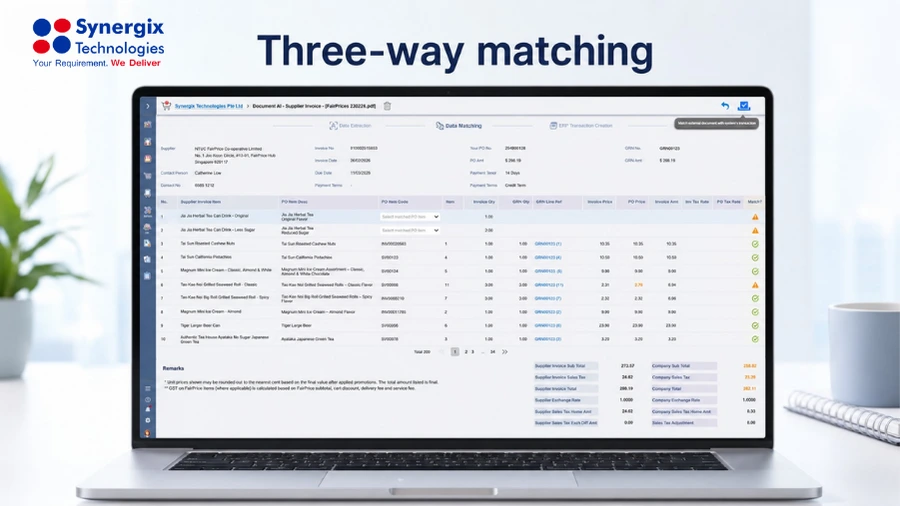
Three-way matching in Synergix ERP
Where The Schedule Usually Slips
- Nobody owns the decision. Three managers with an effective veto will hold up a design sign-off for a month while everyone waits politely for somebody else to go first.
- Data work starts too late. It belongs in week one, not week twelve.
- Scope arrives sideways. “While we’re in there, could it handle servicing as well?” It could. Write it down as phase two.
- One person does the testing. A project lead cannot represent five departments, however well they know the business.
A pattern we see often enough to describe: a forty-person trading firm plans for five months, and discovery and design both land on schedule. Supplier data then takes six weeks rather than three, because two people had been quietly keeping their own price lists, and go-live moves back a month. Nothing went wrong exactly. One assumption was optimistic and everything downstream of it shifted.
Conclusion
An ERP implementation timeline is mostly a resourcing question rather than a software one. Plan for six to twelve months against an industry average of around nine, put the data work in week one instead of week twelve, and keep phase two written down rather than quietly absorbed into phase one. Go-live is where the return starts, not where the project ends, so leave room in the plan for the months after it.
Synergix ERP is developed in-house, which means the configuration and customisation decisions in this article can be made around how your business actually runs without compromising your future upgrades. We have spent 35 years doing this for Singapore SMEs, across more than 600 businesses and 30,000 users.
If you would rather have a timeline built against your own operation than a generic range, request a demo and speak to our team. We will walk you through the stages, the realistic durations for a business your size, and what your team would need to commit at each one. You can also see how other companies handled it on our YouTube channel.