


Dear Valued Customers,
We hope that in 2022, Synergix ERP solutions helped you with the process of discovering new methods to collaborate, learn and innovate.
In the past year, the Synergix team kept working tirelessly to research and discover. We have announced new reports, features, and upgrades for the benefit of all clients as part of our commitment to constant innovation and improvement.
Meanwhile, we’d like to give you a quick rundown of the December improvements!
Thank you for your trust in Synergix Technologies.
Project & Contract
1. UI enhancement of Subcon Claim Opening V1 Screen (FC: TH6_PJ_SUBCON_CLAIM_V1)
At Synergix Technologies, we always strive for the best possible. That is why our designers changed the UI of the V1 Subcon Claim Opening screen.
The current feature and logic in the existing Opening Balance screen remain unchanged. Meanwhile, we change the Document Numbering Scheme selection logic in both subcon claim opening balance and subcon claim screen:
- If a user is tagged to only one numbering scheme for the transaction, the system will default to this Document Numbering Scheme and not show the sentence “Document Numbering Scheme for Account Payable Invoice”.
- If the transaction type has only one numbering scheme, the system will default to this Document Numbering Scheme and not show the sentence “Document Numbering Scheme for Account Payable Invoice”.
- If the user is tagged to more than one numbering scheme, the system will not default to any Document Numbering Scheme. User needs to select from a dropdown list.

The previous Subcontractor Claim Opening screen
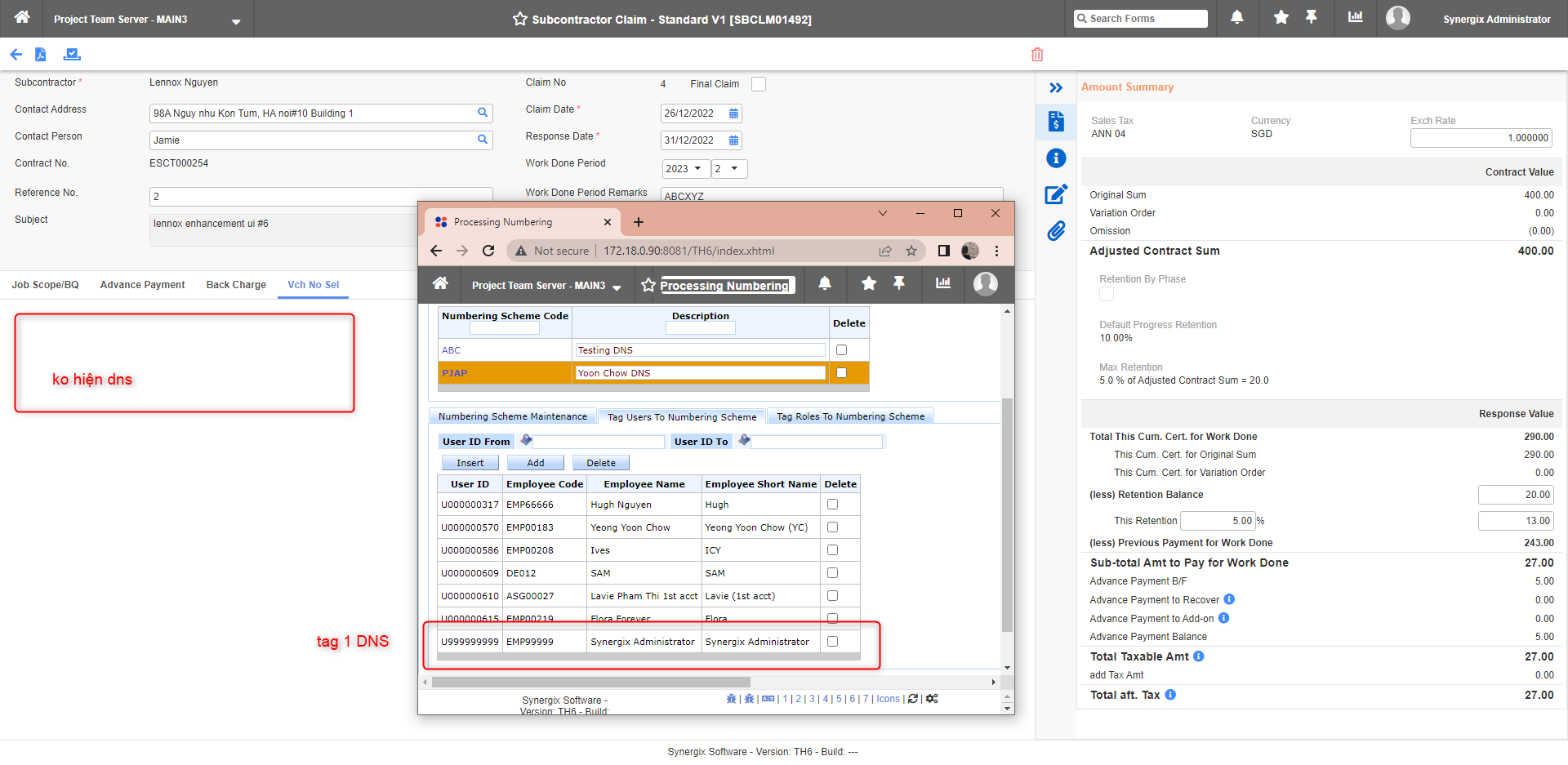
Current Subcontract Claim Opening screen with new Features
2. Menu Rearrangement for Project Module
To make the orders of screens in Project Module more logical and easier for customers to use, we have made some rearrangements of form code orders. We will release in January, 2023.
| Remain current naming “Quotation & Order” | Project Quotation Project Order Update Sales Tax for Outstanding Project Quotation Update Sales Tax for Outstanding Project Order |
| Rename “Costing” to “Budget & Costing” | Project Budget Project Budget Enquiry Project Budget Export Cost Accrual & Reversal Cost Allocation Cost Data Enquiry |
| Billing & Credit Note | Billing Credit Note Project Invoice Revenue Accrual & Reversal Remove Advance Payment Request and move to the claim module because the Advance Payment feature is only available for claim |
| Create a new session “Forecasting & Recognition” | Project Revenue and Cost Scheduling Project Recognition |
| Work Order | Work Order Quotation Work Order Work Order Performance Work Order Billing Work Order Claim Status |
| Service Tracking | Project Service Order Request Schedule Board Project Service Order Performance |
| Others | Project Commission Claim TH6_PJ_COMMISSION_CLAIM TH6_PJ_COMMISSION_CLAIM_CLOSED_PJ Project Site Shipping Address |
3. Change Module Config Label “Enable Cost Control by Budget Schedule No.” (FC: TH5-9105)
In Module Config, we change the name from “Enable Cost Control by Budget Category” to “Enable Budget Control at Budget Sch Level”. The reason being, currently the budget cost prompt is at budget schedule no. level, not budget category level. Hence, the current config name looks might be confusing to Synegix software users.

The old label “Enable Cost Control by Budget Category” in Module Config screen

New name “Enable Budget Control at Budget Sch Level”
SCM & MFG
1. Update Sales Tax for Outstanding TH5 Sales Quotation (FC: TH6_SA_UPDATE_SALES_TAX_FOR_E2_SQ, (TH6_SA_UPDATE_SALES_TAX_FOR_TH5_SQ)
As the Singapore Government will increase GST from 7% to 8% with effective from 01 Jan 2023 and from 8% to 9% with effective from 01 Jan 2024, it is very tedious for ERP systems to update all Outstanding Sales Quotations that are tagged to GST 7%. Hence, we developed a screen so that users can modify themselves and run the update when required. The completed Sales Quotation will not be updated.
Only when users enter a valid Sales Tax Code can they submit the code to the system.
Example:
Existing Sales Tax Code = GST7
Replace with New Sales Tax Code = GST8

Update Sales Tax for Outstanding TH5 Sales Quotation

Update Sales Tax for Outstanding TH5 Sales Quotation