



Dear Valued Customers,
In July 2026, we are pleased to introduce a new set of system enhancements focused on improving workflow efficiency, strengthening operational visibility, and simplifying day-to-day processes across key business functions.
At Synergix, our goal is not only to provide powerful ERP technology, but also to empower businesses with the tools needed to operate more efficiently in an increasingly competitive environment.
Thank you for being part of the Synergix ERP journey. Let’s explore what’s new this July!
PAYROLL & FINANCE
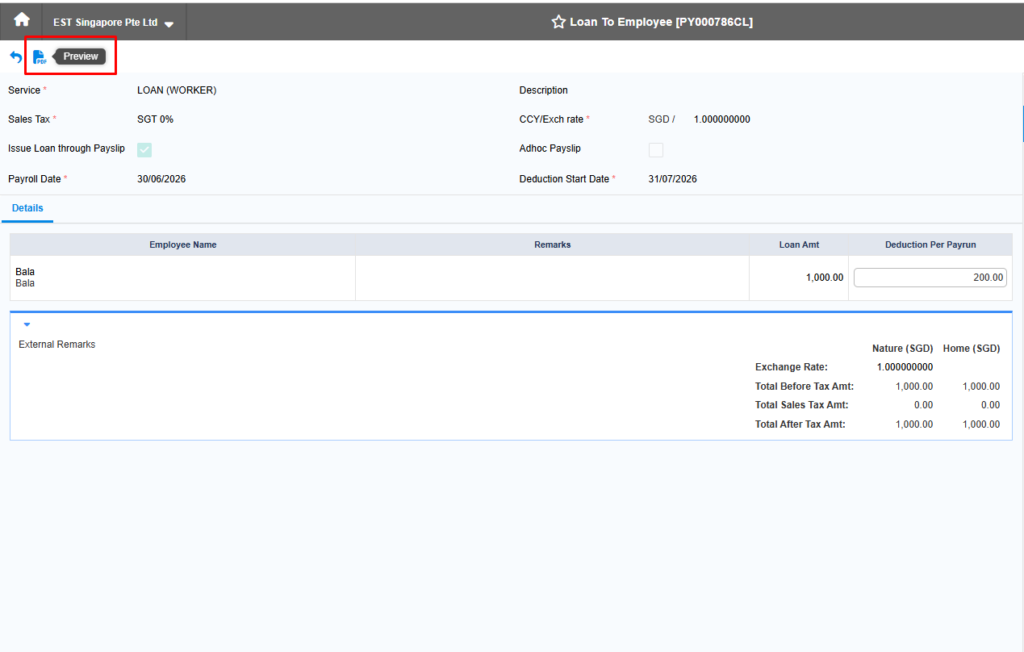
1.Payroll: Handle Loan Agreement Preview for Loan to Employee Screen
Formcode: TH6_LOAN_TO_EMPLOYEE (Business Format: TH6BS_PY_400465)
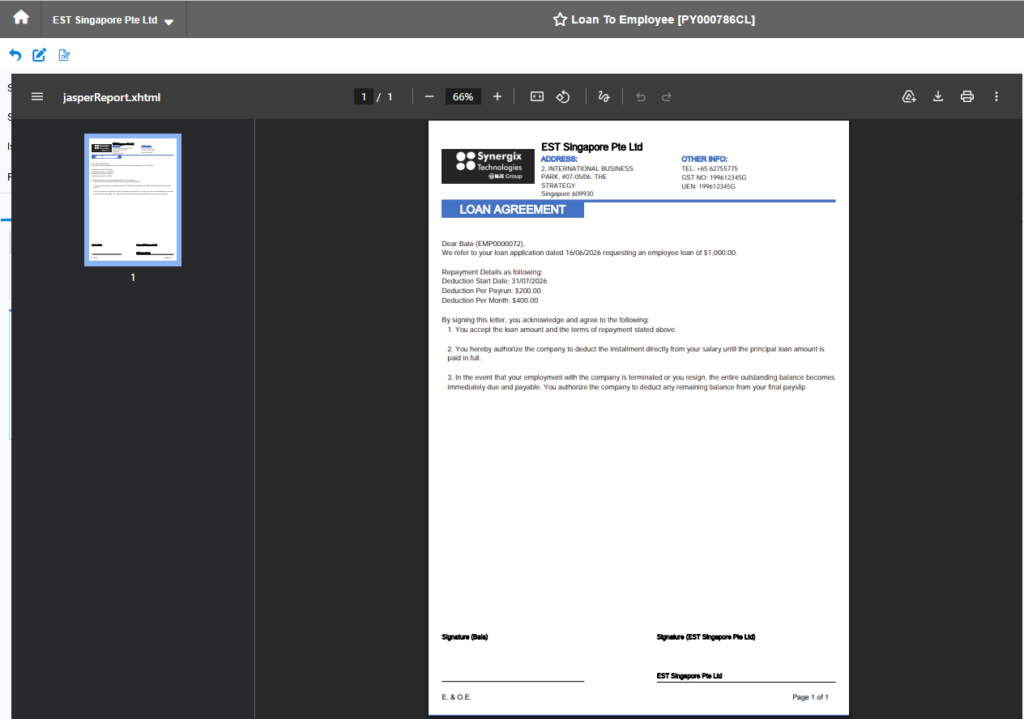
In Synergix ERP Software, A preview button is added to the Loan to Employee screen. After the loan is submitted to the Outstanding tab, users can preview the Loan Agreement directly from the Loan to Employee screen without navigating to another screen. The agreement can also be downloaded or printed for employee acknowledgement and signature.
This enhancement simplifies the loan processing workflow by allowing users to access the Loan Agreement from a single screen. Users can quickly review, download, and print the agreement for employees to sign without switching screens. This improves efficiency, reduces navigation, and provides a more user-friendly experience.
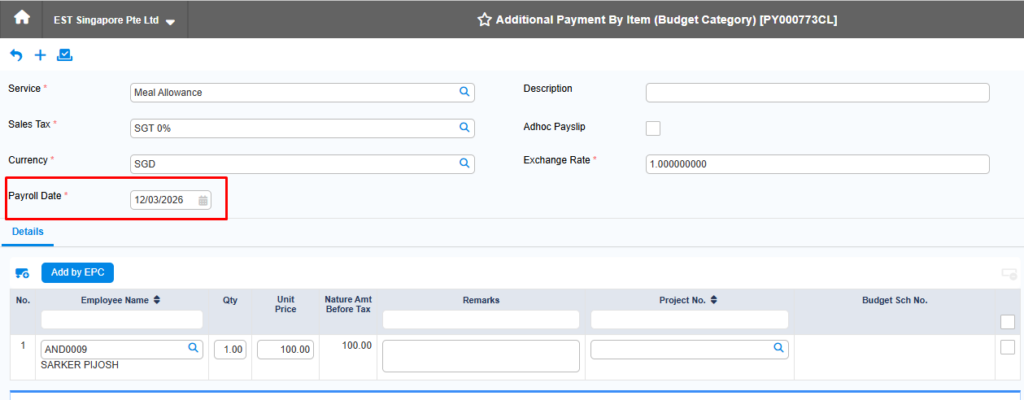
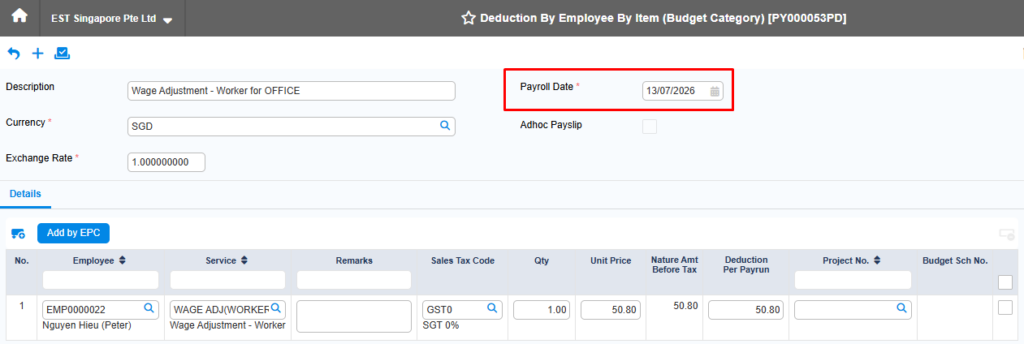
2.Payroll: Allow Change Payroll Date in Deduction Payment TH6 and Additional Payment TH6
Formcode: TH6_PY_DEDUCTION_BY_EMPLOYEE_ITEM_BUDGET_CATEGORY, TH6_ADDITIONAL_PAYMENT_BY_ITEM_BUDGET_CATEGORY
Apply for: Deduction Payment TH6 & Additional Payment TH6 screen, Payroll module
With this enhancement, the Payroll Date is editable even when a draft voucher contains line items. The system updates the payroll date for all related line items automatically (for Additional Payment) and performs validation during submission to ensure the payroll date is valid, employees have active contracts, and the related payroll period has not been processed.
This enhancement eliminates the need to recreate voucher details when the payroll date changes, saving time and reducing manual work. It also ensures data integrity through automatic updates and submission validations, improving the overall user experience and payroll processing efficiency.
PROJECT
1.Attachment at Sales Activity level
Formcode:
+ TH6_LEAD_MANAGEMENT_MOBILE_V1_E2A
+ TH6_OPPORTUNITY_MANAGEMENT_MOBILE_V1_E2A.
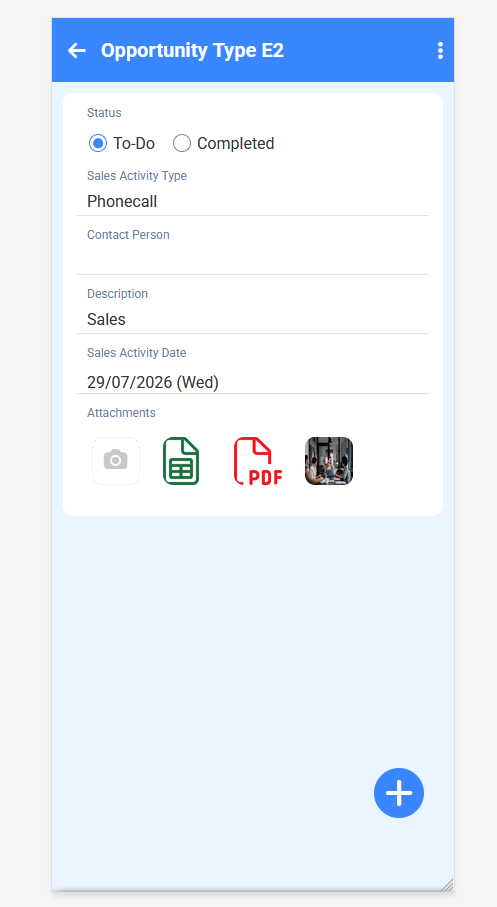
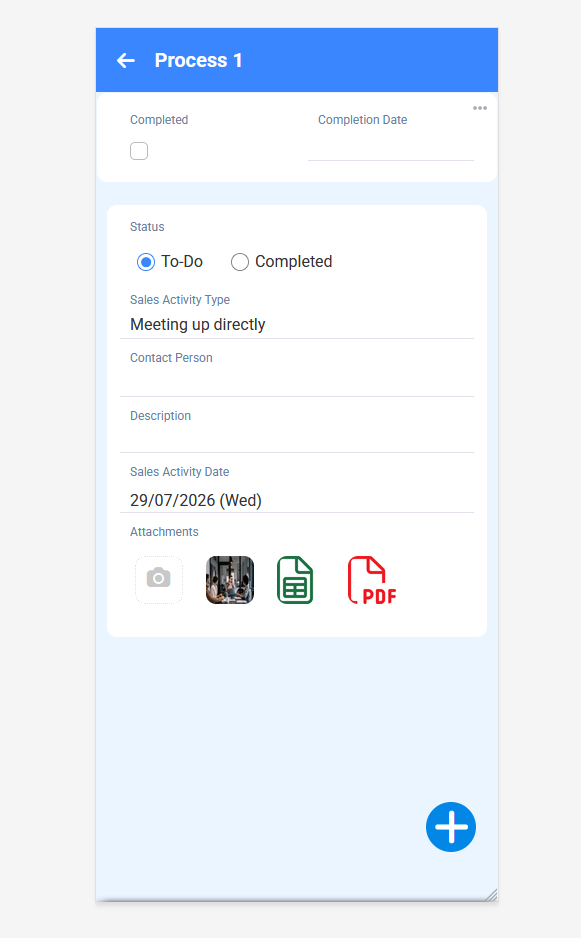
This enhancement was introduced to provide users with a more complete and convenient way tomaintain all relevant sales information within the same activity record.
After this enhancement is released, users can upload, view, download, and delete attachments directly at the Sales Activity level in both Lead Management and Opportunity Management. The feature supports common file formats, including images, PDF, Word, and Excel files, with a maximum file size of 50 MB per attachment. Attachments are displayed together with the related Sales Activity, allowing users to access supporting information easily in both edit and read modes.
This enhancement allows customers to keep sales activities and their supporting documents in one centralized location. It reduces the need to search through separate emails, folders, or external storage and helps sales teams retrieve important information more quickly. As a result, customers can improve collaboration, maintain better activity records, strengthen traceability, and manage lead and opportunity follow-ups more efficiently.
2.Display Employee Short Name instead of Full Name in Project and Project Purchase Module screens
Form code:
+ 166002
+ TH6_PROJECT_QUOTATION_COSTING_SHEET_BY_ITEM_COD_V2
+ TH6_PJ_PROJECT_ORDER_V2
+ TH5_PJ_BILL_BY_PROJECT_PHASE_RETENTION_V1
+ TH5_PJ_CN_BILL_BY_PROJECT_PHASE_V1
+ TH6_STOCK_RETURN_STD
+ TH6_OA_REQUEST
+ TH6_OA_DELIVERY_ORDER
+ TH6_PJ_SOR_PROJECT_ORDER_E2
+ TH6_PJ_WORK_ORDER_QUOTATION
+ TH6_PJ_WORK_ORDER
+ TH6_PJ_WORK_ORDER_PERFORMANCE
+ TH6_PJ_WORK_ORDER_BILLING
+ TH5_PJ_PROJECT_INVOICE_V1
+ TH6_STOCK_ISSUE_PROJECT_MULTI_PMR_V1
+ TH6_STOCK_RETURN_V1
+ TH5_PJ_PROJECT_CREDIT_NOTE_V1
+ TH5_PJ_PROJECT_INVOICE_V1
The enhancement was introduced to standardize how employee names are displayed throughout the affected screens. After this release, relevant employee fields in the affected Project and Project Purchase screens will consistently display the employee’s short name instead of the full name. This applies to both summary and detail pages across various transaction stages. Fields such as Sales Person, Sales Manager, Site Supervisor, Requestor, Operator, Created By, and Last Updated By are included in the enhancement.
This enhancement provides customers with a more consistent and user-friendly experience across Project-related screens. Short names are easier to read, especially in tables and columns with limited display space. It also helps users identify employees more quickly and improves the overall clarity and consistency of transaction information.