


Financial reporting software generates balance sheets, income statements, cash flow statements, and management reports by pulling directly from a company’s accounting and operational data. The category covers 4 different types of products, and picking the wrong type is the most common and most expensive mistake in this purchase.
If you need the fundamentals first (what goes into a financial report, statutory versus management reporting), start with our guide to financial reporting explained.
4 Types of Financial Reporting Software
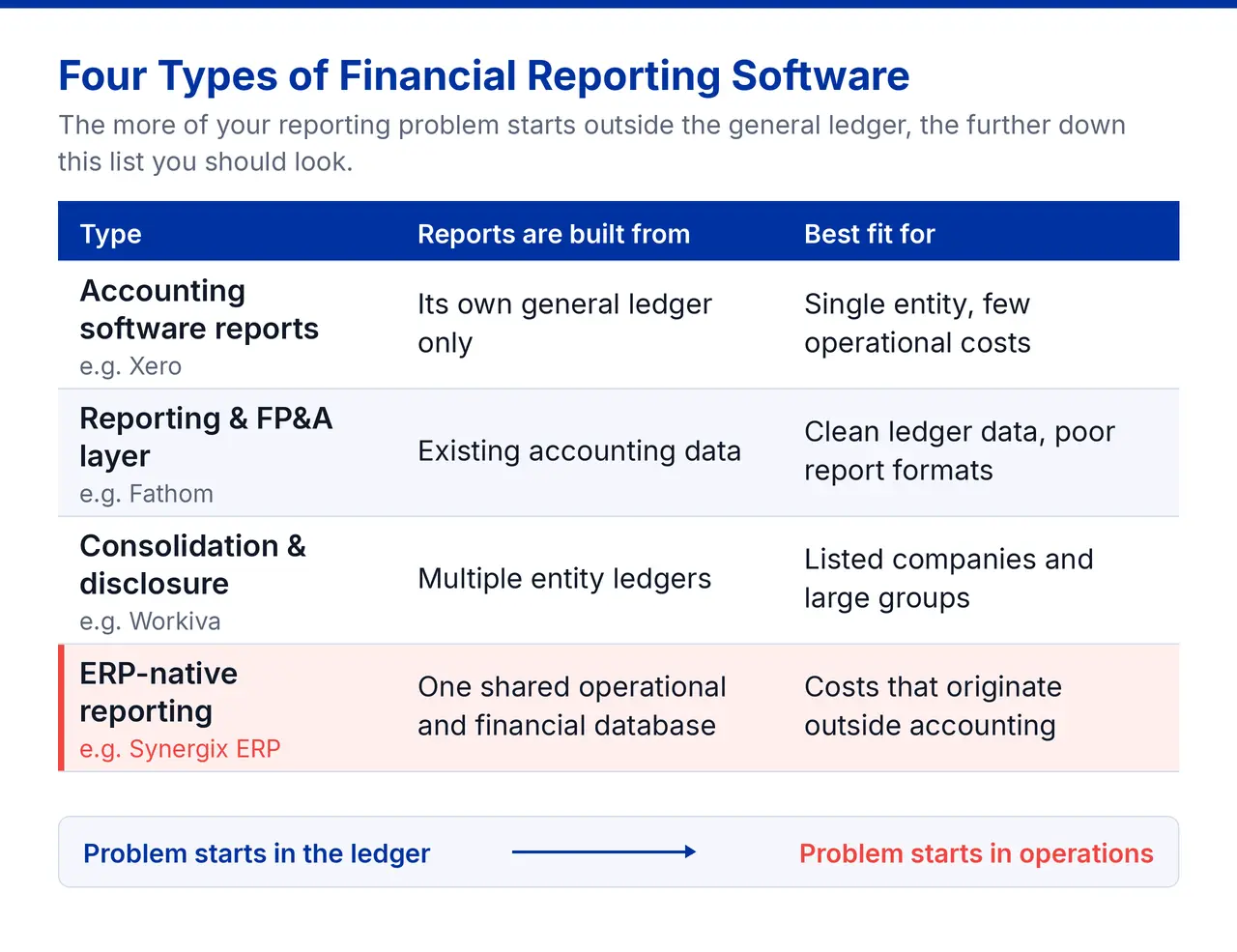
1. Accounting software with built-in reports
Produces standard P&L, balance sheet, and aged receivables reports from its own general ledger. Fine for a single entity where nearly all financial activity is recorded directly in the accounting system.
Example: Xero, used by Singapore SMEs and supported by most local bookkeeping firms.
2. Reporting and FP&A layers
Connects to your existing accounting data and adds dashboards, KPI tracking, forecasting, and variance analysis. This is what most people mean by financial report analysis software. It improves presentation and analysis; it does not improve the underlying data.
Example: Fathom, which sits on top of QuickBooks or Xero and adds management reporting and cash flow forecasting.
3. Consolidation and disclosure management
Handles multi-entity consolidation, intercompany eliminations, currency translation, and statutory or annual report production. This is the category behind most “top financial reporting tools” lists, and it is built for listed companies and large groups.
Example: Workiva, used for annual, interim, and ESG reporting by listed companies.
4. ERP-native financial reporting
Reports built directly on integrated operational and financial data held in one database, so job costs, inventory movements, and production data reach the accounts as they happen rather than through a monthly reconciliation.
Example: Synergix Financial ERP software, widely used by Singapore SMEs and enterprises in project-based and inventory-heavy industries.
| Type | Best fit for |
|---|---|
| Accounting software reports | Micro-businesses, single entity, few operational costs |
| Reporting / FP&A layer | Teams with clean ledger data but poor report formats |
| Consolidation / disclosure | Listed companies and multi-entity groups |
| ERP-native reporting | SMEs where costs originate outside accounting |
A useful test: the more of your reporting problem originates outside the general ledger, the further down this list you should look.
Read more: What is ERP and how does it work?
Diagnose The Problem Before You Shortlist
This is the step most SMEs skip and it’s why a fair number of reporting tools end up shelfware within eighteen months.
Ask where the delay happens in your close:
- Data collection takes days. Someone chases site supervisors, warehouse staff, or project managers for figures that never reached the accounts. → The problem is upstream. A reporting tool cannot reach that data.
- Reconciliation takes days. Numbers exist in two systems and disagree; inventory value in the stock system does not match the GL. → The problem is integration, not reporting.
- Report building takes days. Data is accurate and available, but assembling the pack means rebuilding spreadsheets each month. → A reporting layer or a better report writer can fix this.
- Nobody trusts the numbers. Reports are produced, then argued about. → Usually an audit trail and drill-down problem: people cannot see how a figure was derived.
Only the third is a reporting software problem in the narrow sense. The other three are data architecture problems, which is why they so often lead SMEs toward ERP rather than a point solution.
Financial Reporting Software Features that Matter
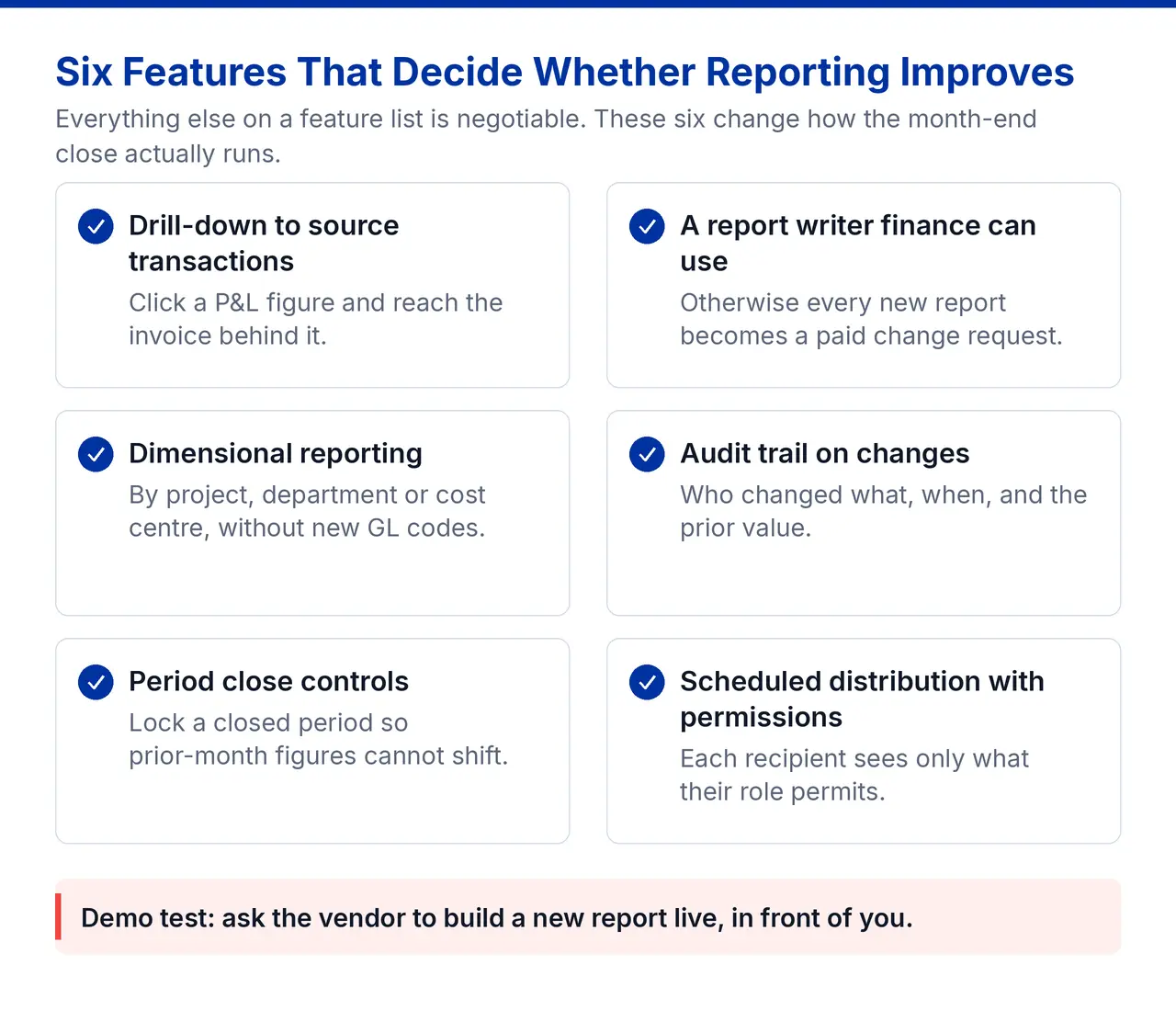
- Drill-down to source transactions: Click a figure in the P&L and reach the invoice, goods receipt, or journal behind it. This single capability resolves most “I don’t trust the numbers” disputes.
- A report writer for finance team: If every new report is a paid change request, your reporting stays frozen at go-live. Ask to see someone build a report during the demo.
- Dimensional reporting: Report by project, department, cost centre, site, or product line without creating hundreds of GL account codes.
- Audit trail on changes: Who changed what, when, and the prior value. Directly reduce audit fieldwork time.
- Period close controls: Locking a closed period so prior-month figures cannot shift after reporting. Sounds minor; prevents an entire class of restatement.
- Scheduled distribution with permissions: Reports that arrive automatically, showing each recipient only what their role permits.
Financial Reporting Software Cost and Support in Singapore
Typical pricing spans a wide range: from SGD 30–100 per user per month to five-figure annual licences. Before setting your budget, it is worth checking whether you qualify for government support: two schemes may help offset the cost.
- Grants for business systems: Singapore SMEs adopting integrated systems may offset part of the cost through enterprise support schemes. Our summary of the latest EDGE grant updates covers the current position for ERP projects.
- Tax deductions on AI spend: If the reporting capability you are buying includes AI features such as anomaly detection, cash flow prediction, or automated variance commentary, the Enterprise Innovation Scheme is relevant. Under IRAS’ Enterprise Innovation Scheme (announced in Budget 2026), eligible companies can claim a 400% tax deduction on up to S$50,000 of qualifying AI spend per YA for YA2027 and YA2028.
GST, Tax, and Regional Entities
GST reporting
Your system should produce GST-ready output and ideally support electronic submission of GST F5 and F8 rather than manual transcription into myTax Portal.
Synergix has supported API submission of GST F5, F8, and IR8A since YA2022, and was recognised by IRAS as a Seamless Filing from Software (SFFS) Silver Partner. In practice, this means your GST return is populated from ledger data and submitted without anyone re-keying figures into myTax Portal, which removes the transposition errors that cause most quarterly corrections.
Multi-entity and multi-currency
Singapore SMEs frequently hold Malaysian, Indonesian, or Vietnamese entities. If that applies, you need consolidated financial reporting software behaviour: intercompany eliminations, currency translation at the correct rates, and a consistent chart of accounts across entities.
Where Synergix ERP Software Fits
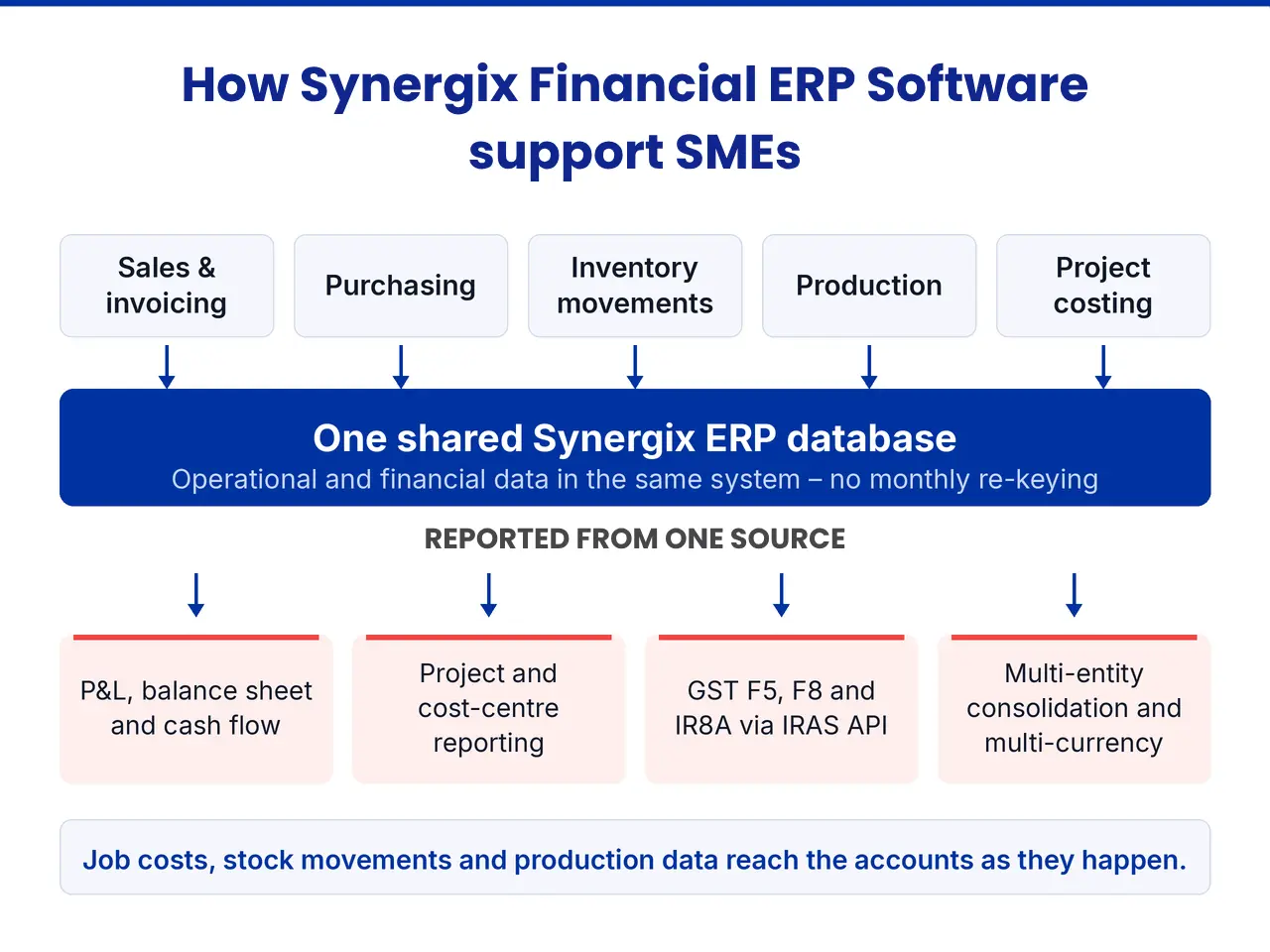
Synergix Financial ERP module sits in the fourth category: financial reporting built on the same database as sales, purchasing, inventory, production, and project costing. That shared data foundation makes it possible to analyse the business without relying on a separate reporting layer or duplicating data.
- Analyse by project, department, or cost centre without having to add GL account codes to every dimension you want to track.
- Reports built beyond standard financial statements, giving finance teams more flexibility over reporting formats and layouts.
- Consolidation and multi-currency included in the finance module, supporting businesses that need to manage multiple entities or currencies.
- Credit terms held per customer as a field the reports use, so receivables ageing can be based on when payment is due rather than simply the invoice date.
AI Built Into the ERP
Synergix embeds AI directly into the system to help finance teams spend less time on routine work and more time reviewing exceptions.
The bank reconciliation agent matches ledger entries against bank statements and surfaces only the items that need attention.
Cash flow intelligence uses live AR, AP, and bank data to help project upcoming cash movements.
Grant Support for Singapore SMEs
Synergix Sales, Accounting and Inventory is also a pre-approved solution under IMDA’s SMEs Go Digital programme. Eligible SMEs may receive PSG co-funding on qualifying costs, subject to current grant rules and the specific solution package.
Still not sure which type you need? Tell us where your month-end stalls and we will tell you whether that’s an ERP problem or a reporting-tool problem.
Talk to a Synergix consultant →