


Business process management (BPM) determines whether your Enterprise Resource Planning (ERP) system will turn into an operational support or simply a database. The companies that succeed in using ERP are those that make business process management the driver for the system’s existence, designing work processes, automating them and continuously improving them as necessary. This guide will show you what it means in practice, as well as why it is important and how to get started.
If your teams continue to rely on email to approve orders, re-enter orders into 3 screens or realise there is a wait at the approval stage after a customer complaint, then this article is for you.
What Is Business Process Management in an ERP Context?
Business process management (BPM) is a disciplined approach to designing, running, tracking and optimising the processes that power your business, such as procurement, order-to-cash, production planning, financial close, and more. Within an ERP system https://www.synergixtech.com/erp-solutions/ , BPM is a set of rules, approvals and automations that can be translated into business processes and actions that can be processed from one business process to the next without manual transfers.
To understand ERP and BPM, it is important to consider them as two parts of the same machine:
ERP acts like a hub for information and unites departments.
BPM is how this data moves, who uses it and when.
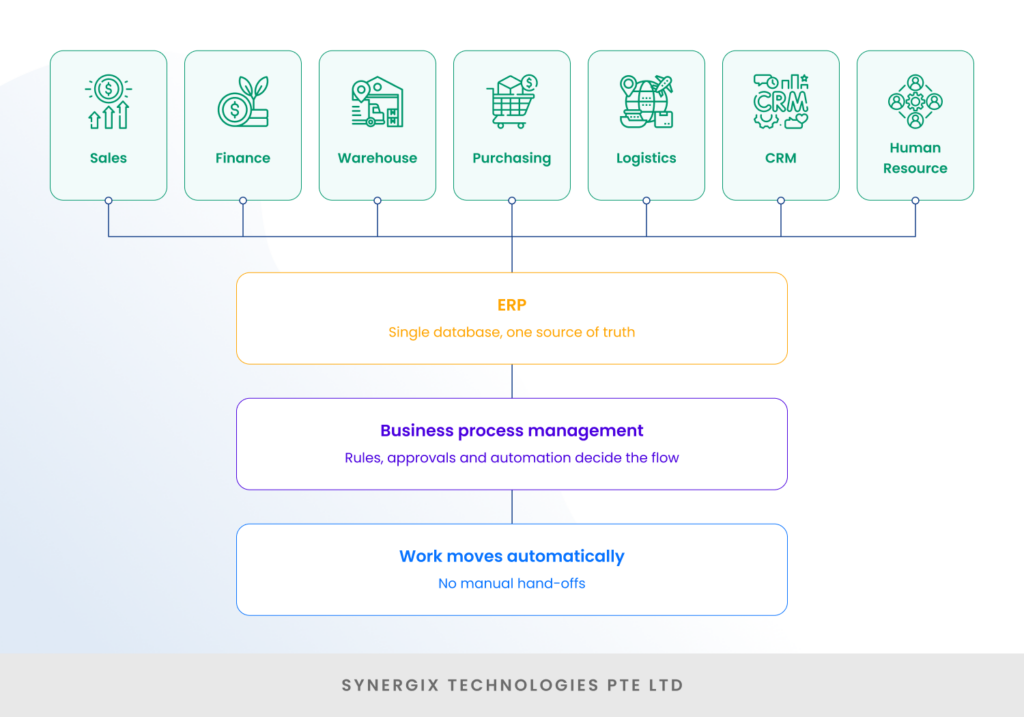
Indeed, ERP has been described by analysts as “business process management software that enables businesses to combine disparate aspects of business process management into a single database, application and user interface,” which is exactly why ERP and business process management go hand-in-hand.
Why Business Process Management Matters More Than the Software Itself
One of the most frequently made missteps is believing that ERP is somehow “supposed” to be accompanied by good processes. It doesn’t. The effectiveness of the software is only as great as the workflows you create within it, and the figures regarding disciplined business process management are hard to ignore.
- According to Forrester research, BPM can provide a productivity improvement of 30-50%.
- The industry-wide savings from automating 64% of relevant tasks in manufacturing came to billions of hours, according to a McKinsey Global Institute analysis.
- For ERP, roughly half of companies (49%) report that ERP improved all their business processes, with another 46% seeing gains in their key processes and only about 5% reporting no improvement. (Source)
There is a contrast here: technology is not the only differentiator. Executives who fail at BPM consistently credit a lack of employee buy-in, which suggests clearly that the results of BPM are determined by process design and adoption, not features.
Learn more: 4 Common ERP Implementation Mistakes And How To Avoid Them
The Business Process Management Lifecycle, Mapped to Your ERP
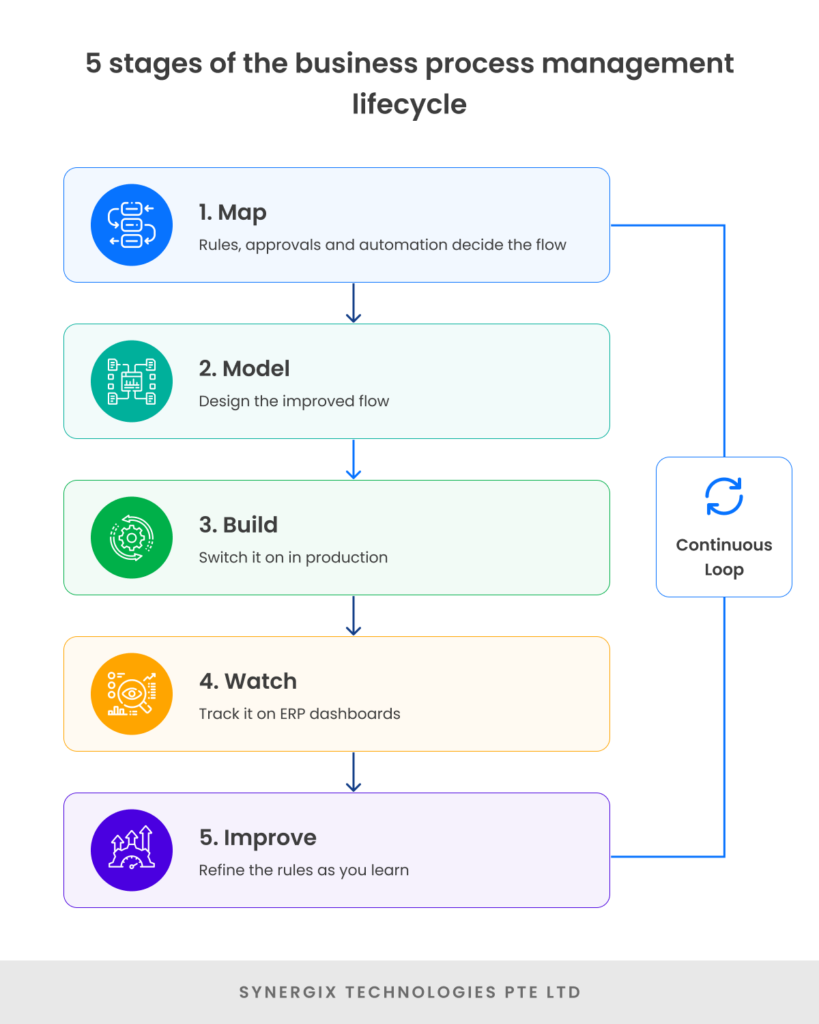
The best approach to integrating business process management into ERP is to adhere to the business process management lifecycle. Most of the frameworks outline five repeatable phases, and each of these translates to an ERP rollout or optimisation project.
| Stage | What you do | How it shows up in your ERP |
| 1. Map | Write down how the process works now | Document the flow before you configure anything |
| 2. Model | Design the better version | Set up the approvals, rules and triggers |
| 3. Build | Put it live | Switch the new workflow on in production |
| 4. Watch | Track what’s happening | Use your ERP dashboards and reports |
| 5. Improve | Keep refining | Adjust the rules as you learn |

Important to note: BPM is not a one-off launch project. The lifecycle is cyclical: you constantly track, learn, and optimise as the business plans, market conditions, and regulations continue to evolve.
Watch more: Synergix Real-time ERP dashboards and reporting
A Practical Example: Fixing Order-to-Cash
The value can be seen in a real workflow. Imagine a medium-sized distributor that lost time along the way in its order-to-cash process.
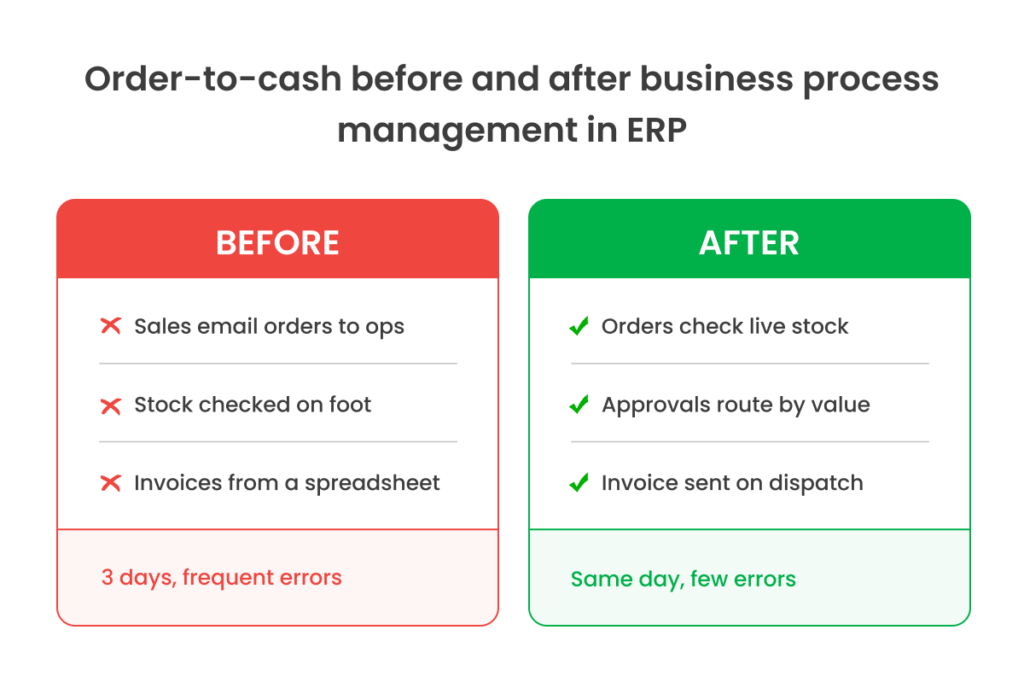
Before BPM in ERP:
- Sales emailed SOs to operations
- Operations manually checked stock by walking to the warehouse
- Finance issued invoices from a separate spreadsheet
- The outcome: 3-day average fulfilment with regular errors in stock
Post-redesigning the process in ERP:
- Orders are automatically validated against real-time inventory level
- Approval is routed automatically based on order value
- Invoices are created at the time fulfilment is confirmed
- The outcome: processing is done in a timely manner and with many fewer mistakes
This is a snapshot of a real benefit ERP vendors provide: If the purchase teams can view in-transit purchase orders, they will neither over-order nor under-order, which is a direct result of building visibility into the process, vs. relying on memory and emails.
How to Get Started With Business Process Management in Your ERP
Apply the following action plan:
- Choose one of the processes that has high volumes and is painful (order-to-cash or procurement is a usual place to begin).
- Draw the “as-is” process with the people who actually perform the process; record all of the hand-offs and delays.
- Determine the manual re-keying, email approval and “waiting for someone” bottlenecks.
- Improve the “to-be” flow by making it automated and having definite rules before editing the configuration.
- Set it up in your ERP and test it out with 1 team.
- Monitor KPIs (cycle time, error rate, cost per transaction) on a dashboard.
- Optimise monthly based on what the data shows.
Fortunately, a modern and automation-ready ERP can perform steps 5–7 much faster, making intelligent and cloud-based platforms that solve business processes the biggest ERP trend.
Read the success stories of successfully reducing approval times in our customer testimonials.
Key Takeaways
- Business process management is the reason ERP delivers value, not a nice-to-have add-on.
- BPM-led initiatives can boost productivity 30-50%, but buy-in and design, not features, determine success.
- Adopt the five phases of the BPM lifecycle: discover, model, implement, monitor, and optimise, and consider it as a perpetual cycle.
- Take small steps on each of the painful processes, relentlessly measure, and improve continuously.
Ready to turn your ERP into a process engine? Schedule a workflow assessment to understand the opportunity that has the greatest impact first.